
01
Identity Security
Review how users, administrators and applications authenticate and access organisational resources.
- Microsoft Entra ID
- Multifactor authentication
- Conditional Access
- Administrative role permissions
- Guest and external access
Microsoft 365 is constantly evolving. Employees join and leave, devices change, new applications are connected and security settings are updated.
Over time, these everyday changes can create inconsistencies in the controls designed to protect your organisation.
IRON IT Group helps businesses explore ongoing Microsoft 365 security assurance, from establishing clear configuration baselines to reviewing security posture, identifying configuration drift and managing agreed improvements.
Maintain a clearer view of your cloud environment and keep security decisions aligned with the way your organisation operates.
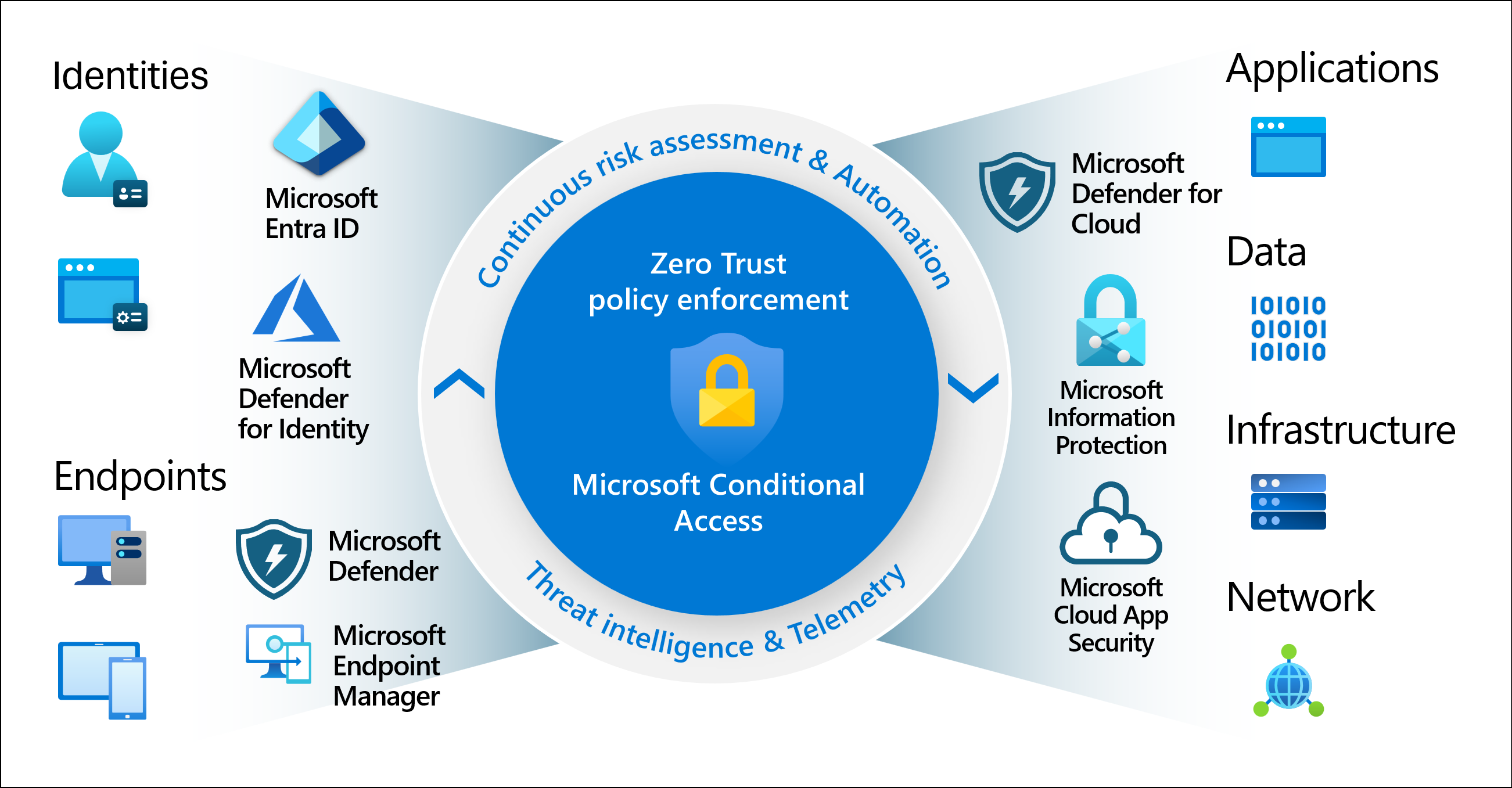
A business may begin with carefully selected security controls, strong authentication and a documented Microsoft 365 configuration.
Months later, new users, device policies, cloud applications and administrative changes may have altered the environment.
Some changes are necessary. Others may introduce inconsistent security settings, excessive permissions or unexpected access.
Managed Cloud Assurance is an approach to reviewing these changes against agreed requirements and maintaining a more consistent security posture over time.
It brings together relevant Microsoft security capabilities, technical oversight, change management and documentation, with the scope and review frequency agreed for your organisation.
Explore Microsoft 365 Security Assurance →An assurance programme can be structured around four core areas. The appropriate tools and controls depend on your licences, environment and agreed service scope.
Review how users, administrators and applications authenticate and access organisational resources.
Evaluate relevant device security settings and the controls used to manage business endpoints.
Assess appropriate information-sharing controls and the handling of sensitive organisational data.
Review supported business applications, integrations and the permissions they require.
A security assessment provides valuable information about the environment at a particular moment. Ongoing assurance extends that work by establishing review and response processes for changes.
Understand the current Microsoft 365 security configuration and identify opportunities for improvement.
Extend the baseline with agreed monitoring, policy reviews, change analysis and structured remediation.
Configuration drift happens when technical settings move away from an agreed or intended state.
A change might be deliberate, such as granting a temporary application exception, or unintended, such as removing a security requirement from a group of users.
The challenge is not that every change is bad. It is determining which changes are expected, which introduce risk and which require investigation or correction.
An assurance process can compare selected settings with a documented baseline, review deviations, assess the business impact and record an authorised decision.
An example of how selected settings could be reviewed against an approved security baseline.
Fictional example only. This is not a live Microsoft dashboard, real monitoring result or an assessment of an IRON IT Group customer tenant.
Microsoft's security ecosystem includes technologies that can support posture assessment, access control and endpoint management. These are official Microsoft documentation visuals, not screenshots of an IRON IT Group-managed tenant.

Understand Microsoft's security recommendations and assess relevant improvements across supported security categories.
View Microsoft Documentation →
Review managed device security capabilities, configuration policies and relevant endpoint protection information.
View Microsoft Documentation →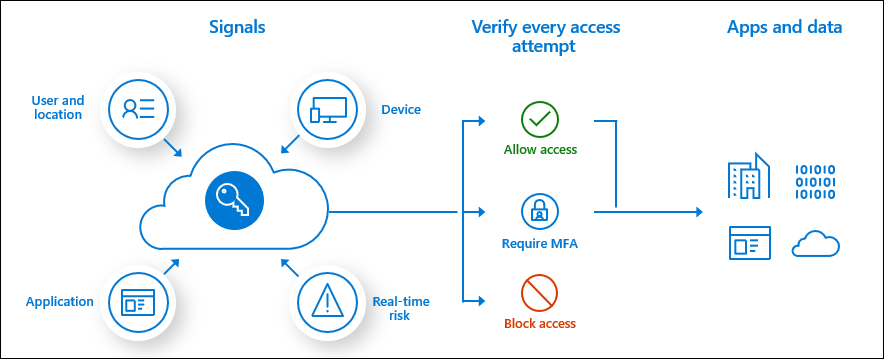
Explore how identity, device and contextual signals can influence access policies across supported applications.
View Microsoft Documentation →Microsoft Learn visuals are provided for explanation. Product interfaces, licence requirements and features can change.
A Microsoft 365 security baseline provides a reference for how selected controls are intended to be configured.
A useful baseline may include identity policies, administrative settings, device protection requirements, data-sharing controls and relevant application security configurations.
Where supported, configuration exports, versioned records or specialised third-party tools may help organisations preserve selected policy settings for later comparison or recovery.
However, backing up configuration policies is different from backing up user emails and files. Not all Microsoft 365 settings have an automatic export, backup or restore capability.
A suitable approach should therefore identify exactly which configurations can be captured, how they are protected and what steps would be required to recover them.
Microsoft Secure Score provides a way for organisations to evaluate their adoption of supported Microsoft security recommendations.
It brings together relevant information about identities, devices, applications and data, depending on the available products and licensing.
An assurance review can use Secure Score recommendations as one source of information when prioritising improvements.
However, the highest possible score is not automatically the correct target for every business. Recommended changes must be assessed against operational requirements, user impact, technical dependencies and accepted risks.
Secure Score is also not a guarantee against security incidents or a complete measurement of every cyber risk.
An ongoing assurance programme should establish how settings are reviewed, how deviations are assessed and how approved changes are managed over time.
Agree relevant security settings, controls and intended configuration standards.
Use suitable Microsoft tools and agreed processes to review relevant security information.
Detect or discover deviations, security findings and changes requiring attention.
Determine impact, technical dependencies, business requirements and appropriate priority.
Implement or recommend authorised remediation according to the agreed service scope.
Document changes, outstanding risks and opportunities for future improvement.
Ongoing assurance can help businesses make more informed security decisions while reducing reliance on infrequent manual reviews.
Improve awareness of relevant Microsoft 365 controls, settings and areas needing review.
Use documented configuration expectations to support a more consistent operating environment.
Review important changes rather than relying entirely on periodic manual assessment.
Maintain relevant documentation that can assist with internal governance and assurance discussions.
Evaluate security controls in the context of employee access, applications and business operations.
Develop practical procedures for reviewing or recovering supported security settings when necessary.
Microsoft 365 security capabilities vary according to the subscriptions and additional products a business uses.
Microsoft 365 Business Premium, Microsoft 365 E3 and E5, and separate Microsoft Entra, Intune, Defender or Purview licences can provide different levels of security functionality.
A managed assurance programme should establish which features are available before deciding how to monitor, report on or manage security configurations.
Certain managed service provider tools, including Microsoft 365 Lighthouse, also have specific partner eligibility and customer requirements.
The right approach depends on tenant size, existing licences, risk priorities, available tooling and the scope of any external service agreement.
Answers to common questions about Microsoft 365 security baselines, configuration drift, ongoing assurance, Microsoft security products and tenant administration.
Managed Cloud Assurance is an ongoing approach to overseeing agreed cloud security configurations, identifying relevant changes and maintaining appropriate security practices. For Microsoft 365, it can involve baseline reviews, posture assessments, policy change management and structured remediation.
Microsoft 365 environments change as users, devices, applications, policies and platform capabilities evolve. Important changes can affect access permissions, data-sharing practices and security settings, making periodic or ongoing reviews valuable.
Configuration drift occurs when technical settings move away from a defined baseline or intended state. It may result from authorised changes, emergency fixes, platform updates or unintended administrator activity.
No. Many changes are necessary and appropriate. An assurance process helps distinguish authorised changes from unexpected or potentially unsafe deviations and determines whether action is needed.
A programme may consider identity security, endpoint security, data protection and cloud application security. Exact coverage depends on the agreed service scope, technical compatibility and available licences.
A security baseline is a documented set of expected settings or controls for the environment. It provides a reference for reviewing configuration, assessing change and maintaining agreed security standards.
Selected configurations may be documented, exported or protected through supported Microsoft interfaces, APIs or specialised tools. Not all policies can be backed up or restored automatically. Coverage should be verified individually.
No. Microsoft 365 Backup focuses on supported Exchange Online, SharePoint and OneDrive information. Configuration protection concerns preserving or recreating selected administrative and security policy settings.
Not universally. Some changes may be recoverable through supported tools, while others require manual remediation or recreation. A managed assurance agreement should specify the available recovery methods and required approvals.
Microsoft Secure Score is a Microsoft Defender capability that provides a numerical representation of supported security recommendations and the extent to which certain controls have been implemented. It helps guide improvements but does not guarantee protection against breaches.
No. Secure Score is a useful source of recommendations, but an effective security programme also requires risk assessment, operational processes, staff awareness, incident response, data protection and other controls.
Microsoft Entra ID provides identity and access management capabilities. Depending on licensing, this may include authentication policies, Conditional Access, identity protection and administrative access controls.
Conditional Access is a Microsoft Entra capability that uses relevant signals, such as identity, device state and context, to determine which access controls should apply when accessing supported resources.
Yes. Where available and included in scope, Microsoft Intune can provide useful device configuration, security baseline and compliance information as part of an endpoint assurance approach.
Relevant Microsoft Defender products can support security posture visibility, threat protection and operational investigation. The exact tools and available data depend on product licensing and configuration.
Yes. Depending on licensing and technical scope, Microsoft Purview information protection, Data Loss Prevention and governance capabilities may contribute to the data security component of an assurance programme.
Connected applications and permissions may be included in an agreed security review. Microsoft Entra and Microsoft Defender for Cloud Apps provide relevant capabilities, although visibility and supported controls vary.
No. Microsoft provides platform security and various security management capabilities, but organisations remain responsible for significant aspects of tenant configuration, access permissions, workload settings and operational security.
Microsoft 365 Lighthouse provides eligible managed service providers with capabilities for managing customer tenants, security settings and selected alerts at scale. Its use requires applicable partner eligibility, customer permissions and other prerequisites.
No. Appropriate security oversight can help identify and manage certain risks, but no service can prevent every cyberattack, configuration error, outage or other security incident.
Documented security reviews and configuration records may support audit preparation and compliance discussions. However, compliance also depends on legal obligations, policies, processes and other requirements; ongoing assurance is not a compliance certification.
It may be useful for smaller organisations that depend on Microsoft 365 but have limited internal capacity to review changing security configurations. The appropriate coverage should reflect risk, budget and available technology.
An existing environment can be reviewed to establish relevant baseline findings, identify security priorities and determine whether ongoing assurance activities would be appropriate.
Monitoring frequency, automated alerting, human response hours and support targets must be defined in the agreed service contract. This page does not imply round-the-clock staffing or immediate remediation.
Some changes can affect sign-in, device access, application permissions or collaboration. Appropriate assessment, testing, communication and change approval can help manage these effects.
Pricing depends on the number of users and devices, Microsoft licensing, tools, included security controls, review cadence, configuration protection and support requirements. Contact IRON IT Group to discuss a suitable scope.
Managed assurance can complement your wider Microsoft cloud, information protection and technology management requirements.
Explore Azure infrastructure, cloud security, identity, connectivity and operational management.
Explore Microsoft Azure →Explore information protection, classification, Data Loss Prevention and governance capabilities.
Explore Microsoft Purview →Explore recovery options for supported Exchange Online, SharePoint and OneDrive information.
Explore Microsoft 365 Backup →Talk to IRON IT Group about Microsoft 365 security assessments, configuration baselines, ongoing assurance, identity, endpoint security, data protection and cloud application governance.