WORKPLACE / 01
Managed Workplace Support
Explore coordinated IT support, user assistance, device administration and suitable management processes for business technology.
Explore IT Support →Today's workplace is no longer defined by a single office, desk or device. Your employees need technology that connects people, supports collaboration and protects business information wherever work happens.
IRON IT Group helps organisations explore modern workplace solutions built around Microsoft 365, Microsoft Teams, SharePoint, device management, cloud communications and secure access to business applications.
From workplace planning and technology deployment to adoption, governance and ongoing support, we help bring your people and systems into a more connected digital environment.

Many organisations use different platforms for communication, document management, devices, project coordination and remote access.
When these systems are poorly connected, employees may spend valuable time searching for information, switching between applications or asking IT teams for assistance.
A Modern Workplace strategy considers how these different technologies can work together to improve the everyday experience of employees.
Microsoft 365 provides a broad collection of productivity and collaboration services, while tools such as Microsoft Intune, Entra ID and other security technologies can support appropriate workplace management.
The right solution should be based on your business needs, application compatibility, available Microsoft licences and the people who use the technology.
Explore Workplace Transformation →A simplified view of the different technologies that can support a modern digital workplace.
Explore the essential workplace services that support connectivity, communication, employee devices and everyday IT operations.
Explore coordinated IT support, user assistance, device administration and suitable management processes for business technology.
Explore IT Support →Review business internet, office networking, wireless access and appropriate connectivity arrangements for cloud applications and collaboration.
Explore Connectivity →Explore business calling, cloud telephony and compatible communication platforms that support office, remote and hybrid employees.
Explore Voice & Telephony →Manage suitable laptops, desktops, tablets and mobile devices with appropriate enrolment, configuration, compliance and support practices.
Explore Device Management →Explore subscription or lifecycle-based approaches to obtaining, maintaining and replacing eligible workplace hardware and software.
Explore Technology as a Service →Deliver supported Windows desktops and applications through centrally managed Azure-hosted virtual desktop environments.
Explore Azure Virtual Desktop →Microsoft's productivity ecosystem brings together collaboration, file management, business communication, AI-assisted tools and device management.

Bring together supported team conversations, meetings, shared content and integrated applications through Microsoft Teams.
Explore Microsoft Teams → Official Microsoft Teams promotional visual.
Create suitable intranets, shared document libraries and structured content experiences that help authorised teams find and use information.
Explore Microsoft SharePoint → Official Microsoft SharePoint promotional visual.
Review device security, configuration and compliance management with Microsoft Intune for supported endpoints.
Explore Device Management → Official Microsoft Learn Intune administration example.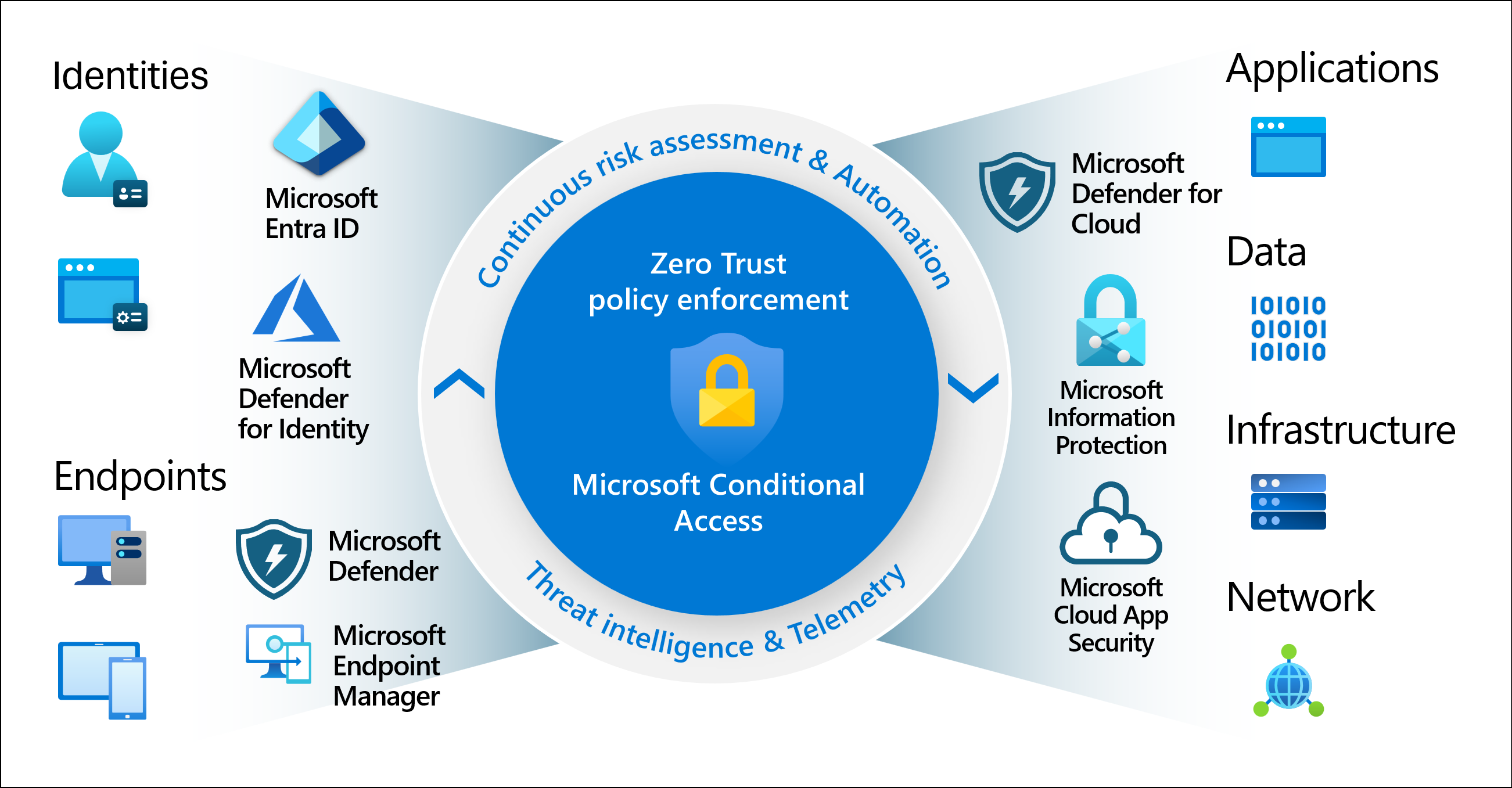
Use suitable Microsoft Entra identity capabilities and supported access controls to help protect workplace resources.
Explore Managed Cloud Assurance → Official Microsoft Learn Zero Trust architecture illustration.From Microsoft 365 and Teams to AI adoption and cloud security, explore the additional solutions that can help modernise how your business operates.
Explore Microsoft 365 applications, email, cloud storage, licensing, deployment, migration and ongoing administration.
Explore Microsoft 365 →Improve workplace communication through supported Teams messaging, channels, meetings and collaboration features.
Explore Microsoft Teams →Explore business intranets, document management, file collaboration, content governance and SharePoint administration.
Explore Microsoft SharePoint →Explore AI-assisted productivity within eligible Microsoft 365 experiences, supported by appropriate governance and employee readiness.
Explore Microsoft Copilot →Review security settings, identity, sharing permissions, administration, governance and licensing across the Microsoft 365 tenant.
Explore Best Practice Configuration →Explore ongoing Microsoft 365 security posture reviews, configuration baseline management and relevant cloud security assurance activities.
Explore Managed Cloud Assurance →Hybrid and remote working introduce additional requirements for connectivity, communication, device administration and secure application access.
Employees may work from different offices, homes or customer sites while relying on the same business applications and shared information.
Microsoft Teams, Microsoft 365 and suitable cloud desktop technologies can support different flexible working scenarios.
However, secure remote access should be planned alongside device security, identity, networking, user experience and support requirements.
A connected workplace gives employees access to important information and applications, which makes identity and information protection essential.
Microsoft offers security capabilities across services such as Microsoft Entra, Microsoft Intune, Microsoft Defender and Microsoft Purview.
The available protection depends on the products licensed and how the organisation configures its environment.
Modern Workplace planning should consider who can access information, how devices are secured and how changes to business systems are managed.
A modern workplace can include Windows desktops, laptops, Apple devices, phones, tablets and other business endpoints.
Managing these devices consistently can help organisations establish approved configurations, software deployment procedures and suitable security controls.
Microsoft Intune supports device management for eligible platforms and provides capabilities for enrolment, configuration, compliance and application management.
An effective device strategy should consider procurement, onboarding, employee changes, operating system support, security and eventual device replacement.

Successful digital workplaces are built around the everyday needs of employees rather than simply the applications an organisation owns.
Staff should understand where to find business information, how to communicate with colleagues and how to access suitable help when technology changes.
A people-focused approach includes training, documentation, accessible processes and opportunities for employees to provide feedback.
Discuss Your Workplace Goals →Microsoft 365 Copilot offers AI-assisted experiences within eligible Microsoft 365 applications and services.
Depending on available licences and features, these experiences may support document drafting, summarisation, information exploration and suitable collaboration scenarios.
Before introducing workplace AI, organisations should review how their information is stored, who can access it and whether existing permissions are appropriate.
Adoption should also consider employee training, security controls, approved use cases and the business value of the selected technology.
The value of a modern workplace comes from selecting the right tools, configuring them appropriately and helping people use them effectively.
Explore connected communication and document collaboration across supported applications.
Plan suitable access to business systems for office, hybrid and remote employees.
Review opportunities to improve document creation, communication and common employee workflows.
Include appropriate identity, endpoint and information protection requirements.
Consider more consistent processes for managing business users, devices and applications.
Support suitable onboarding, guidance and training for new and existing workplace tools.
Modern Workplace projects should combine technical planning with business requirements, employee adoption and ongoing operational responsibilities.
Understand employees, applications, devices, connectivity and existing workplace challenges.
Review Microsoft licensing, technical compatibility, identity, security and collaboration requirements.
Plan suitable technologies, configuration, migration activities and governance arrangements.
Implement agreed changes, validate systems and support employee training and communication.
Review adoption, operational issues, security, licensing and future workplace requirements.
Microsoft 365 includes different subscription plans with varying productivity, collaboration, device management and security entitlements.
The appropriate licence depends on how employees work, which applications they need and the security features required by the organisation.
Some services, including certain Microsoft Copilot, Teams Phone, advanced security and Azure Virtual Desktop scenarios, may require additional licences or separate consumption charges.
A licensing review can help identify overlapping subscriptions, missing entitlements and opportunities to align the Microsoft environment with actual business requirements.
Answers to common questions about Microsoft 365, Teams, SharePoint, hybrid working, device management, security and Modern Workplace services.
A Modern Workplace is an approach to using connected technology that supports communication, collaboration, productivity and appropriate security. It often combines cloud applications, identity management, device administration and employee support.
Microsoft Modern Workplace generally refers to using Microsoft technologies, including Microsoft 365, Teams, SharePoint, Entra and Intune, to support connected business operations and employee productivity. It is not a single standalone licence or product.
Modernisation may help address disconnected communication, fragmented document management, outdated devices or challenges supporting employees across different locations. Benefits depend on the technologies selected and how they are adopted.
Microsoft 365 is a collection of subscription services and applications for productivity, communication, collaboration and other business requirements. Available products and security capabilities depend on the selected plan.
Not exactly. Microsoft 365 can include familiar applications such as Word, Excel, PowerPoint and Outlook, along with cloud and collaboration services, depending on the subscription. Traditional perpetual Office licences have a different commercial and feature model.
Teams may replace or consolidate certain messaging, meeting and calling tools. The appropriate solution depends on business requirements, telephone connectivity, compatibility, licensing and user adoption.
Yes, with suitable Teams Phone entitlements and an appropriate connection to the public telephone network. Available options depend on region, provider, licensing and configuration.
SharePoint supports document libraries, business intranets, content management, collaboration and other information-sharing scenarios. Security and governance depend on appropriate configuration and permissions.
OneDrive is generally designed around an individual's work files, while SharePoint supports shared sites, team content and organisational information management. Both technologies can be used together in Microsoft 365.
Yes. Microsoft 365 includes services that may support employees working from different locations. Organisations should also consider device security, network connectivity, authentication and application compatibility.
Azure Virtual Desktop is Microsoft's Azure-based desktop and application virtualisation service. It enables supported Windows desktops and applications to be delivered remotely, subject to licensing and infrastructure requirements.
Some organisations support bring-your-own-device arrangements, but these should be assessed carefully. Suitable identity, application protection, device controls and organisational policies are important.
Microsoft Intune provides endpoint management capabilities for supported devices and applications. Depending on licensing and platform support, it can help organisations manage configuration, security and device compliance.
Yes. Microsoft Intune supports selected management capabilities for macOS, iOS and iPadOS devices. Features and enrolment options vary by platform, ownership model and configuration.
Eligible Microsoft 365 Copilot experiences may assist with drafting, summarisation, information exploration and other supported tasks. Results depend on product capabilities, licences, data permissions and responsible employee usage.
No. Microsoft offers different Copilot experiences, and some features require additional paid licences or usage arrangements. Eligibility should be checked against the specific products and subscription terms.
No. Microsoft provides security features, but organisations remain responsible for important configuration choices, permissions, data protection, device management and ongoing security processes.
Microsoft Entra ID provides cloud identity and access management capabilities used by Microsoft 365 and other supported applications. Available access management features depend on licensing.
Managed Cloud Assurance is an ongoing approach to reviewing agreed cloud security configurations, identifying relevant deviations and maintaining an appropriate security baseline.
Microsoft 365 migration activities can be scoped according to the source environment, data, users, licensing, technical compatibility and agreed implementation requirements.
An existing tenant can be reviewed for configuration, licensing, identity, security, collaboration and governance requirements. Recommendations should be based on an assessment of the organisation's actual environment.
Appropriate identity management, device provisioning, application setup and employee guidance can help establish more consistent onboarding processes. The result depends on the systems, automation and procedures used.
Managed device administration and IT support can be discussed as part of a scoped service arrangement. Actual coverage, supported platforms, response targets and hours must be confirmed in the service agreement.
Timescales depend on the organisation's size, existing systems, user count, data volumes, networking, security requirements, licensing and the employee adoption work involved.
Costs depend on the selected Microsoft subscriptions, devices, communication requirements, migration work, security tools and ongoing support. Contact IRON IT Group to discuss a suitable scope.
Workplace technology can be complemented by cloud infrastructure, business security, intelligent applications and suitable IT support.
Explore Microsoft Azure, cloud strategy, infrastructure, migration and business continuity.
Explore Microsoft Copilot, Power Platform, business automation and intelligent business technologies.
Explore workplace support, business technology administration and appropriate managed IT services.
Talk to IRON IT Group about Microsoft 365, Teams, SharePoint, cloud telephony, device management, Azure Virtual Desktop, Microsoft Copilot, workplace security and modern IT support.