Modern network and server infrastructure in a data centre
IRON IT Group | Connectivity

Stay connected. Keep business moving.

From cloud applications and Microsoft Teams calls to essential business systems, your organisation depends on reliable connectivity every day.

Your network should do more than provide access to the internet. It should support employees, connect business locations, protect important traffic and provide a clear plan for disruption.

IRON IT Group helps organisations explore business fibre, dedicated internet access, secure networking, SD-WAN, resilient connections and connectivity solutions designed around business requirements.

Business Fibre Dedicated Internet SD-WAN Secure Connectivity Network Resilience
01 Right-sized connectivity Match connection options to business demands.
02 Multi-site networking Connect offices, cloud systems and applications.
03 Resilience planning Explore backup circuits and automatic failover.
04 Network visibility Plan troubleshooting, monitoring and support.
Business Connectivity Solutions

Your network is the foundation of your modern workplace.

Every email, cloud application, video meeting and online business service depends on suitable network connectivity.

As organisations adopt more cloud technology, the importance of network performance, reliability and security continues to grow.

Slow downloads are only one possible problem. Poor Wi-Fi coverage, insufficient upload bandwidth, packet loss, unstable routing and outages can also interrupt everyday work.

A suitable connectivity strategy should consider the number of employees, applications in use, office locations, service availability, security requirements and future business plans.

IRON IT Group takes a wider approach to connectivity planning by considering how the internet connection works alongside your local network, firewall, cloud services and employee devices.

Explore Network Connectivity Planning →
Modern business office environment with connected workspaces
A connected workplace starts with a capable network. Plan connectivity around the systems, people and locations your business depends on.
Business Internet Options

Choose the connection that fits your business.

Different internet services have different capabilities, installation requirements and commercial terms. The right choice depends on your location and operational needs.

02

Dedicated Internet Access

Consider dedicated fibre or Ethernet services for businesses with demanding connectivity, more predictable bandwidth requirements or defined service commitments.

Depending on the provider, services may include symmetrical bandwidth and contractual performance or repair provisions.

Suitable for: Critical applications and more demanding environments
03

Business Ethernet Services

Explore Ethernet-based services for suitable internet access, private connectivity or connections between different business locations.

Carrier availability, circuit capacity and installation requirements depend on the premises and service area.

Suitable for: Multi-site and dedicated network requirements
04

UK SOGEA Broadband

For eligible UK premises, Single Order Generic Ethernet Access provides broadband without requiring a traditional analogue telephone service.

SOGEA uses the supported local access infrastructure and is distinct from a full-fibre-to-premises service.

Availability: UK locations where supported by the access provider
05

Business 4G & 5G Internet

Consider suitable mobile-network connectivity for eligible offices, temporary locations and backup internet links.

Performance depends on coverage, signal conditions, network congestion, equipment and provider terms.

Suitable for: Flexible access and certain backup connectivity scenarios
06

Satellite Business Connectivity

Explore supported satellite internet services for remote locations, temporary operations or areas with limited terrestrial infrastructure.

Low Earth Orbit services may provide an alternative where appropriate, subject to coverage, installation and commercial requirements.

Suitable for: Remote sites and selected resilient connectivity designs

Service availability, speeds, static IP options, service levels and installation costs must be confirmed for the specific business address.

Compare Business Internet Options

Different connections serve different requirements.

Use this overview to understand the general differences between common business internet services.

Connection Typical Characteristics Common Use Considerations
Business FTTP Fibre access with service-dependent upload and download speeds Office productivity, SaaS and general cloud access Coverage, contention, upload speed and repair terms
Dedicated Internet Dedicated provisioned capacity and provider-specific service commitments Business-critical connectivity and demanding applications Higher cost, installation lead time and circuit diversity
UK SOGEA Broadband delivered over supported copper-based access infrastructure Eligible UK small-business premises Line distance, availability and achievable speeds
4G / 5G Mobile-network-based internet connectivity Temporary offices or secondary WAN access Signal strength, coverage, data limits and congestion
LEO Satellite Satellite service without local terrestrial last-mile access Remote sites or certain backup scenarios Equipment placement, weather, pricing and provider coverage
This comparison is indicative, not a speed or availability guarantee. Dedicated circuits can also experience outages, and a leased-line SLA does not guarantee uninterrupted service.
Advanced Network Connectivity

More than an internet connection.

Growing organisations may require additional network capabilities to connect locations, protect traffic, manage performance and prepare for outages.

01 / MULTI-SITE

Wide Area Networks

Explore suitable WAN architectures for connecting offices, facilities and applications across different locations.

02 / SOFTWARE-DEFINED

SD-WAN

Evaluate software-defined WAN technologies for centrally managing suitable connections, traffic policies and application routing.

03 / PRIVATE NETWORKS

MPLS & Private Connectivity

Consider suitable carrier-managed network services when business applications need predictable private routing or site connectivity.

04 / SECURITY

Site-to-Site VPN

Connect compatible offices or private networks using appropriately secured VPN tunnels and supported network equipment.

05 / RESILIENCE

Dual-WAN & Backup Internet

Plan secondary connections and suitable failover procedures for important business connectivity.

06 / OPERATIONS

Network Monitoring

Explore monitoring, notifications, performance trends and appropriate provider escalation arrangements.

Network Resilience & Failover

Prepare a second route when your primary connection fails.

An internet outage can interrupt business applications, cloud communications, customer services and remote access.

A resilient network design may combine a primary fibre connection with another eligible internet service such as a second carrier circuit or mobile-network access.

When supported network equipment is configured appropriately, traffic can be redirected to an available secondary connection after a detected failure.

However, two connections do not always provide true independence. Both may rely on shared street ducts, exchanges, power supplies or provider infrastructure.

A suitable resilience assessment considers these dependencies, the expected failure behaviour and what the business needs to keep operating.

  • Primary and secondary ISP assessment
  • Independent access routes where available
  • Dual-WAN firewall or router support
  • Automatic failover considerations
  • Application and VPN failover behaviour
  • Backup power requirements
  • Recovery and failback procedures
  • Periodic resilience testing
Discuss Resilient Internet Connectivity →
Dual-WAN Business Network ILLUSTRATIVE DESIGN

One network. Two potential paths.

An example of a business network with a primary connection and a suitable backup link.

PRIMARY WAN Business Fibre Main internet service for everyday business traffic.
SECONDARY WAN Backup Connection Alternative carrier, 5G or another supported access method.
Business Firewall / SD-WAN Router Connection health checks, routing policies and supported failover decisions.
Office Network Cloud Applications Business Telephony
Conceptual architecture only. Failover may interrupt active sessions, alter public IP addresses or affect VPNs, inbound services and application availability.
Microsoft 365 Network Optimisation

Help Microsoft 365 traffic take a better route.

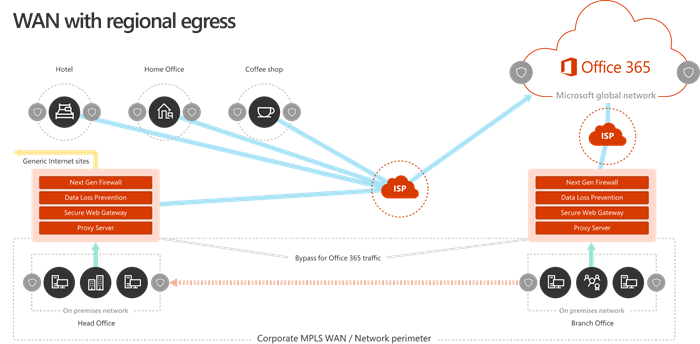
Microsoft 365 services are distributed across Microsoft's global network, with service entry points in many geographic locations.

Microsoft recommends considering local internet egress, suitable DNS resolution and avoiding unnecessary network detours for eligible Microsoft 365 traffic.

For some businesses, routing cloud traffic through a distant headquarters or an unsuitable central proxy can add latency and affect the user experience.

Network optimisation should still respect the organisation's security policies, regulatory requirements and application dependencies.

  • Microsoft 365 network assessment
  • Local internet egress considerations
  • DNS resolution planning
  • Microsoft 365 endpoint requirements
  • Firewall and proxy configuration
  • VPN split-tunnelling assessment
  • WAN and SD-WAN traffic policies
  • Application performance troubleshooting
Explore Microsoft 365 →
Microsoft 365 Connectivity Principles

Network design affects cloud application experience.

Local Egress Evaluate whether eligible Microsoft 365 traffic can reach appropriate nearby service entry points.
Reduced Latency Assess routing paths, proxy behaviour and unnecessary traffic backhauling.
Endpoint Configuration Review applicable Microsoft 365 service endpoints and the required firewall rules.
Security & Governance Balance routing optimisation with organisational security controls and relevant obligations.
Microsoft Connectivity Architecture

Explore networking through Microsoft's architecture guidance.

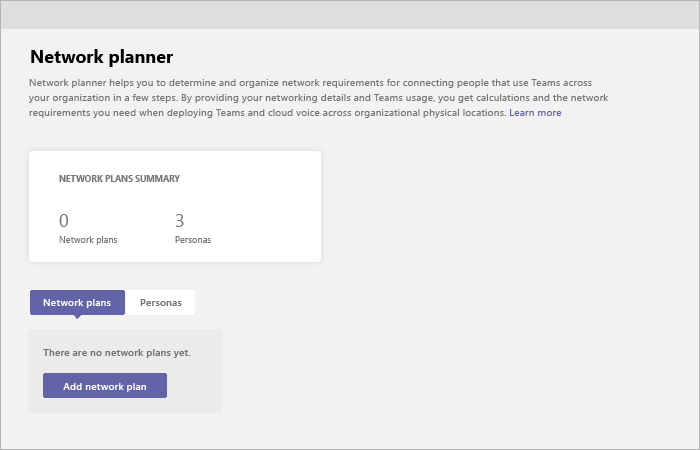
These Microsoft Learn diagrams provide technical examples of Microsoft 365 WAN design, Azure hybrid connectivity and Microsoft Teams network planning.

Microsoft documentation examples are for educational reference. They do not depict a deployed IRON IT Group customer network.

Microsoft Teams & Cloud Voice

Good voice and video quality start with good networking.

Business internet connectivity plays an important role in the quality of Microsoft Teams meetings and cloud phone calls.

Voice and video traffic can be affected by latency, jitter, packet loss, Wi-Fi coverage and network congestion.

A network that performs well during ordinary web browsing may still experience problems during real-time meetings or high-demand calling periods.

Microsoft offers tools such as Call Quality Dashboard and Teams network planning guidance to help evaluate the network and investigate call-quality issues.

  • Microsoft Teams network readiness
  • Voice and video bandwidth assessment
  • Latency, jitter and packet loss
  • Wi-Fi coverage and capacity
  • Quality of Service considerations
  • Supported network ports and endpoints
  • Call Quality Dashboard
  • Ongoing performance reviews
Explore Voice & Telephony →
Real-Time Communications

Connection speed is not the only factor.

Latency Excessive network delay can affect the experience of real-time conversations.
Jitter Variation in packet arrival times can interfere with audio and video quality.
Packet Loss Lost network packets may produce audio dropouts or degraded calls.
Wireless Quality Signal strength, interference and client density can affect meeting performance.
Microsoft Azure Connectivity

Connect business locations to the Microsoft cloud.

Some organisations operate systems across both on-premises networks and Microsoft Azure.

These environments may require connectivity between offices, servers, remote users and Azure-hosted workloads.

Azure VPN Gateway supports appropriate encrypted site-to-site and point-to-site connectivity scenarios.

Azure ExpressRoute provides private connectivity through supported connectivity providers for workloads with suitable business, technical or compliance requirements.

Azure Virtual WAN can also support more complex branch and hybrid network architectures.

The correct solution depends on available providers, performance needs, security requirements, architecture and costs.

  • Azure Virtual Network considerations
  • Site-to-site VPN connectivity
  • Point-to-site VPN requirements
  • Azure VPN Gateway
  • Azure ExpressRoute assessment
  • Azure Virtual WAN suitability
  • Network routing and segmentation
  • Hybrid network resilience
Explore Microsoft Azure →
Hybrid Cloud Networking

Choose the connection based on your workloads.

Site-to-Site VPN Establish suitable encrypted connectivity between an existing network and Azure over the public internet.
ExpressRoute Explore supported private connectivity through a provider for eligible business workloads.
Virtual WAN Consider centrally organised networking for more extensive branch and hybrid connectivity requirements.
Operations Plan routing, monitoring, security and recovery responsibilities across the connected environments.
Secure Business Connectivity

Performance and security should work together.

Business connectivity planning should include appropriate network protections, not simply the choice of internet provider.

01 / FIREWALL

Network Perimeter Protection

Review suitable firewall controls, access rules and traffic policies for business networks.

02 / SEGMENTATION

Network Separation

Explore appropriate VLANs and security boundaries for users, guests, servers and other devices.

03 / SECURE ACCESS

VPN Connectivity

Evaluate suitable encrypted network connections for authorised offices and remote users.

04 / WIRELESS

Business Wi-Fi Security

Plan supported wireless authentication, guest access and secure configuration practices.

05 / MONITORING

Network Visibility

Explore traffic insights, device health, suitable alerts and documented escalation arrangements.

06 / GOVERNANCE

Network Change Management

Document important network configurations, administrative ownership and approved technical changes.

Business technology team collaborating in a modern workplace
Connected People, Connected Business

The best network is one your employees can rely on.

Your connectivity influences how employees communicate, collaborate and use important business technology.

Reliable access to cloud applications, video meetings and shared information helps support daily operations across offices and remote locations.

A good connectivity strategy brings together performance, security, resilience and the experience of the people using the network.

Discuss Your Network Requirements →
Ongoing Connectivity Management

A network needs attention after installation.

Business requirements, applications and connectivity providers change over time. An appropriate management approach helps maintain visibility and clear technical ownership.

01 / VISIBILITY

Network Health Monitoring

Review suitable device, link and service monitoring capabilities for business connectivity.

02 / PERFORMANCE

Traffic & Capacity Reviews

Assess bandwidth usage, performance trends and changing application requirements.

03 / PROVIDERS

Carrier Coordination

Define suitable responsibilities for working with connectivity providers during incidents or service changes.

04 / SECURITY

Firewall & Network Administration

Review supported network configuration, updates, access controls and ongoing security responsibilities.

05 / CONTINUITY

Failover Testing

Assess whether secondary connections and approved recovery procedures behave as intended.

06 / IMPROVEMENT

Network Optimisation

Explore technical changes that may improve application experience and operational visibility.

Monitoring schedules, provider escalation, incident response hours and service levels depend on the agreed service contract.

Our Connectivity Approach

From network assessment to ongoing performance.

Connectivity projects should bring together the business's application requirements, available providers, network design and appropriate operational arrangements.

STAGE 01

Discover

Understand sites, employees, applications, existing connections and business priorities.

STAGE 02

Assess

Review available service options, bandwidth, security, resilience and network dependencies.

STAGE 03

Design

Plan suitable access services, equipment, routing, security and failover arrangements.

STAGE 04

Implement

Coordinate approved installation, configuration, testing and service transition.

STAGE 05

Review

Assess operational performance, support requirements and future connectivity needs.

Frequently Asked Questions

Business Connectivity FAQs.

Answers to common questions about business broadband, dedicated internet, fibre connections, SD-WAN, backup connectivity and Microsoft cloud networking.

What is business internet connectivity?

Business internet connectivity refers to services that provide organisations with network access to internet and cloud resources. Different business products offer varying bandwidth, support arrangements, commercial terms and service commitments.

What is the difference between business and residential internet?

Business internet services may provide different support options, static IP addresses, commercial terms, dedicated capacity or defined service commitments. Features vary by provider and product; not every business connection offers guaranteed performance.

What is FTTP?

Fibre to the Premises uses fibre-optic infrastructure to deliver connectivity to the customer location. Available bandwidth, symmetry and performance depend on the access network and purchased service.

What is a dedicated leased line?

A dedicated leased line or dedicated internet access service provides provisioned capacity under agreed carrier terms. Availability, service levels, bandwidth and restoration commitments vary by provider.

Does a leased line guarantee zero downtime?

No. Even dedicated circuits can experience outages. Provider SLAs may define remedies, response targets or service credits, but they do not guarantee that a connection will never fail.

What is SOGEA broadband?

SOGEA stands for Single Order Generic Ethernet Access. It is a UK broadband access product that operates without a separately ordered traditional analogue phone service. Availability and performance depend on the local network.

Is SOGEA available in the United States?

SOGEA is a UK-specific product name. US businesses should instead compare suitable locally available services such as fibre broadband, business Ethernet, dedicated internet access and wireless connectivity.

What is symmetrical internet?

Symmetrical internet generally provides equal or comparable advertised upload and download capacity. It can be helpful for suitable workloads that need significant upstream bandwidth, although actual performance depends on the service.

How much internet speed does my business need?

Requirements depend on employees, simultaneous application use, cloud services, video meetings, voice calls, data transfers and other workloads. A network assessment can help establish suitable capacity rather than choosing a connection by headline speed alone.

Can a business have two internet connections?

Yes. A business can use compatible network equipment to connect to more than one ISP. A suitable design may support failover or traffic distribution, depending on the services and configuration.

Does dual-WAN mean we will never lose connectivity?

No. Both services may share physical infrastructure or depend on the same power, hardware or upstream systems. Failover can also interrupt existing application sessions.

Can 5G be used as backup business internet?

Yes, where coverage, hardware, carrier arrangements and application requirements make it suitable. Mobile-network performance may change with congestion, signal conditions and data plan limitations.

Is satellite internet suitable for business?

Satellite services can be useful in remote areas or as an alternative access method. Their suitability depends on coverage, performance, reliability, installation requirements and business applications.

What is SD-WAN?

Software-Defined Wide Area Networking is an approach to managing WAN connectivity through software-based policies and supported devices or services. It can help organisations manage traffic across different connections and locations.

What is MPLS?

Multiprotocol Label Switching is a packet-forwarding technology used in various carrier networks. It may support private WAN services and traffic engineering, but MPLS alone does not provide end-to-end encryption.

What is a site-to-site VPN?

A site-to-site VPN connects compatible networks using a supported secure tunnel, commonly over the public internet. Authentication, encryption, routing and operational reliability depend on the chosen design.

What is Azure ExpressRoute?

Azure ExpressRoute provides private connectivity between on-premises networks and Microsoft cloud services through a supported provider. It differs from an internet-based site-to-site VPN and requires separate service planning.

Can our office network connect directly to Microsoft Azure?

Yes. Azure supports multiple hybrid connectivity options, including site-to-site VPN and ExpressRoute. The appropriate approach depends on your architecture, provider availability, applications and security requirements.

Can network configuration affect Microsoft 365 performance?

Yes. DNS, internet egress, proxy configuration, firewall rules, VPN routing and network latency can affect Microsoft 365 connectivity. Microsoft publishes guidance on routing traffic efficiently to its services.

Can a network affect Microsoft Teams call quality?

Yes. Insufficient bandwidth, jitter, latency, packet loss, weak Wi-Fi coverage and unsuitable network devices can cause problems with voice and video communication.

Does Quality of Service help with Microsoft Teams?

Quality of Service can help prioritise relevant real-time traffic on networks under your control, particularly when there is congestion. It does not create additional bandwidth or guarantee performance across unrelated provider networks.

Can multiple offices share the same business network?

Yes. Depending on requirements, offices can be connected through suitable WAN, VPN, SD-WAN or carrier-provided services. The design should consider security, routing, performance and resilience.

What is business Wi-Fi management?

Business Wi-Fi management may include access point configuration, wireless security, coverage planning, capacity, guest networking, updates and troubleshooting.

Can business connectivity be monitored?

Supported network equipment and services can provide health information, performance measurements and alerts. Monitoring frequency and human response depend on the available tools and service agreement.

Can IRON IT Group review our existing network?

A connectivity assessment can be scoped around your sites, service contracts, existing network equipment, application requirements, security, resilience and available improvement options.

Does IRON IT Group provide 24/7 network monitoring?

Monitoring hours, automated alerts, human response and incident escalation arrangements should be confirmed within the service agreement. This page does not imply continuous staffing or guaranteed issue resolution.

Can we get a new business connection at any address?

Not necessarily. Availability depends on the service provider, network coverage, infrastructure, building access, installation requirements and local permissions.

How long does business internet installation take?

Timescales vary by product and location. Existing fibre or mobile services may have different activation requirements from a dedicated circuit that needs construction or new infrastructure.

How much does business connectivity cost?

Costs depend on the service type, bandwidth, premises, contract term, installation, network equipment, support and provider charges. Contact IRON IT Group to discuss your requirements.

Related Modern Workplace Services

Build a connected technology environment.

Business connectivity works alongside communication systems, cloud infrastructure and secure digital workplace services.

01 / COMMUNICATIONS

Voice & Telephony

Explore Microsoft Teams Phone, VoIP, business calling and cloud communications.

Explore Voice & Telephony →
02 / CLOUD NETWORKING

Cloud Infrastructure

Explore Microsoft Azure networking, virtual infrastructure, hybrid environments and security.

Explore Cloud Infrastructure →
03 / WORKPLACE TECHNOLOGY

Modern Workplace

Explore Microsoft 365, collaboration, device management and connected workplace solutions.

Explore Modern Workplace →
Build a More Connected Business

Ready to improve your business connectivity?

Talk to IRON IT Group about business fibre, dedicated internet, SD-WAN, multi-site networks, backup connectivity, Microsoft 365 performance and secure access to cloud infrastructure.