
01
Microsoft 365 Tenant Assessment
Review the current configuration, available licences, important services and potential gaps against agreed requirements.
Microsoft 365 supports essential business communication, collaboration, identities and information. But the way your environment is configured plays an important role in how securely and effectively those services operate.
Weak account protections, unnecessary permissions, inconsistent sharing settings and poorly managed licences can create avoidable security and operational risks.
IRON IT Group helps organisations assess Microsoft 365 configurations, identify areas for improvement and plan appropriate security, governance and licensing changes.
From Microsoft Entra and Defender to Exchange Online, SharePoint, Teams and Intune, explore a more structured approach to your Microsoft cloud environment.

Microsoft 365 introduces a broad collection of cloud services, each with its own settings, permissions, administrative controls and security capabilities.
Over time, organisations may introduce new accounts, applications, external collaborators and business processes without reviewing how the overall configuration has changed.
This can lead to unnecessary administrative access, inconsistent sharing policies, outdated authentication methods and licences that no longer match employee requirements.
A best practice configuration review examines the environment against relevant Microsoft guidance and the organisation's own business and security needs.
The objective is not to enable every feature indiscriminately. It is to identify suitable controls, consider business impact and implement approved changes in a planned manner.
Explore Microsoft 365 Tenant Reviews →Review the principal areas that contribute to an appropriately secured, organised and manageable Microsoft 365 environment.
Review the current configuration, available licences, important services and potential gaps against agreed requirements.
Assess Microsoft Entra accounts, multifactor authentication, supported access controls and administrative roles.
Evaluate Microsoft recommendations, their business relevance and suitable security improvement priorities.
Review applicable email authentication, anti-phishing, malware protection and mail-flow configurations.
Assess site permissions, external sharing, information ownership and relevant access settings.
Review meeting policies, guest access, external collaboration, application controls and team ownership.
Assess eligible endpoint compliance, configuration, device enrolment and management requirements.
Review supported email, endpoint and threat-protection settings according to available products and licences.
Explore suitable information protection, retention, sensitivity labels and data governance capabilities.
Assess unused licences, user assignments, subscription overlap and opportunities for better licence allocation.
Review privileged roles, app permissions, emergency administrator access and change-management practices.
Develop suitable documentation, review schedules, reporting and operational ownership for future improvements.
A Microsoft 365 assessment should provide more than a list of settings.
It should identify potential risks, explain their relevance to the organisation and distinguish immediate priorities from longer-term improvements.
Microsoft Secure Score can provide useful recommendations across supported identity, device, application and data security categories.
However, a higher score is not a guarantee that an organisation is secure. Recommendations should be assessed in the context of business impact, available licensing and other safeguards.
The result of a suitable assessment is a prioritised plan with documented findings, proposed changes and clear responsibilities.
An example of the areas an assessment may examine. No live tenant data is shown.
Microsoft 365 security and management use several connected administration experiences. These Microsoft-hosted visuals illustrate selected tools relevant to configuration reviews.
Explore Microsoft Defender security information and supported Secure Score recommendations.
View Microsoft Secure Score →
Review supported approaches to authentication requirements and Conditional Access deployment.
View Conditional Access Guidance →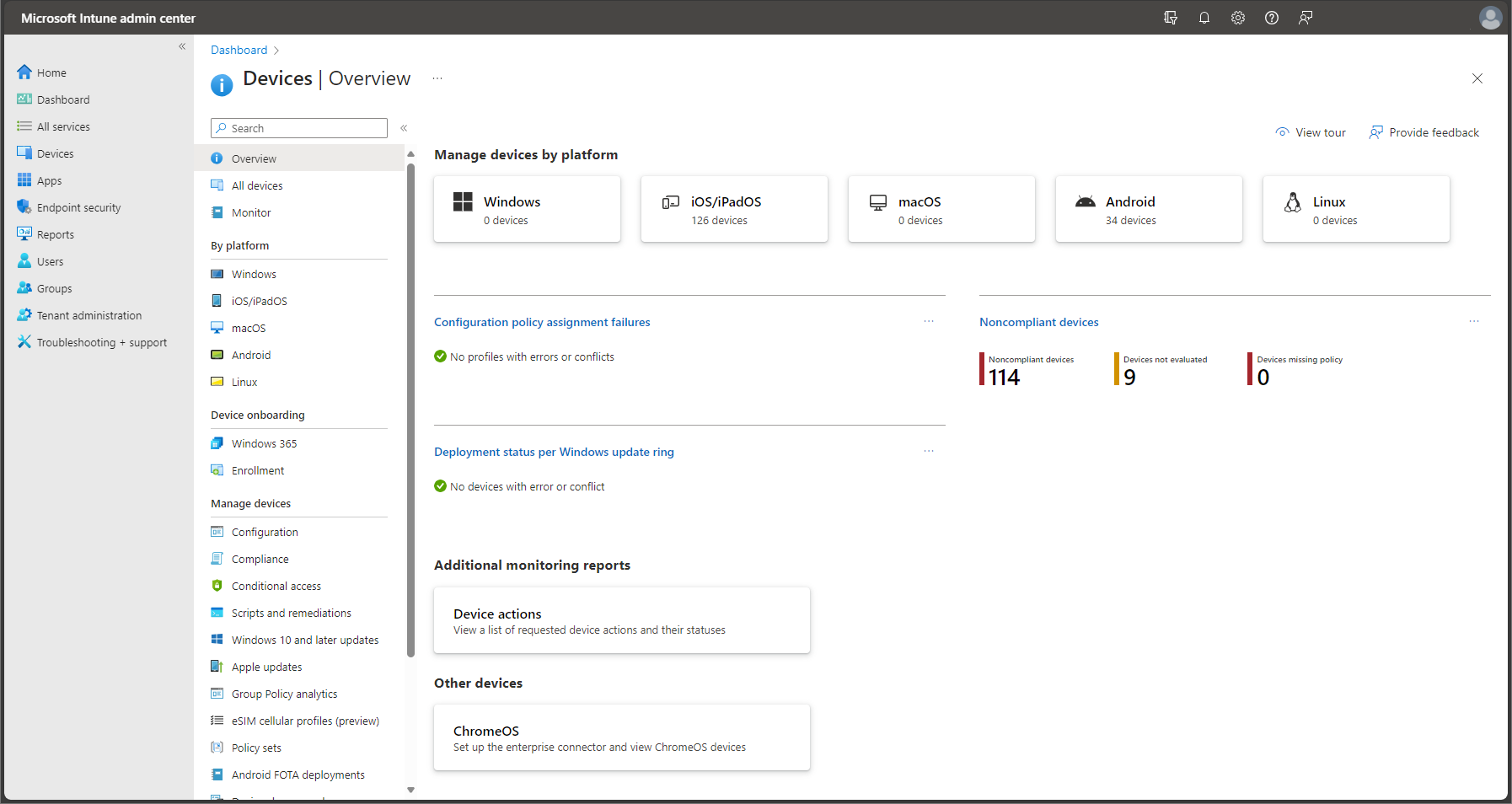
Explore the administration of supported business devices, policies and management capabilities.
View Microsoft Intune →Product illustrations may display historical interface versions or example organisations. They do not show IRON IT Group client environments.
Business accounts provide access to email, collaboration, files and applications. The way those accounts are protected is an important part of Microsoft 365 security.
Microsoft Entra ID provides identity and access management capabilities, including supported authentication requirements and administrative permissions.
For eligible environments, Conditional Access can evaluate signals such as user identity, device state and other conditions before allowing access to suitable resources.
Microsoft recommends careful deployment of these policies, including test users, report-only evaluation and appropriate emergency access arrangements.
A configuration review should consider the organisation's actual licensing and needs rather than assume every security control is available or appropriate.
Email remains an important communication tool and a common target for phishing, impersonation and malicious attachments.
Exchange Online provides core business email capabilities, while Microsoft offers additional email protection through supported Exchange Online Protection and Defender for Office 365 features.
Microsoft recommends reviewing email authentication records and suitable threat-protection settings.
For eligible Microsoft Defender for Office 365 environments, Standard and Strict preset security policies provide recommended protection settings for relevant users and scenarios.
A business email security review should also consider mail-flow requirements, false positives, third-party systems and important operational dependencies.
Microsoft Teams, SharePoint and OneDrive help employees collaborate and share business information.
However, these services also require suitable policies for external users, shared files, team ownership and appropriate administrative access.
An organisation may unintentionally accumulate unused teams, outdated guest access or document libraries with permissions that no longer reflect business needs.
A configuration review can assess relevant site settings, external sharing options, team creation policies and information governance.
The objective is to help employees collaborate in a way that remains consistent with approved security and privacy requirements.
Employee devices are an important part of the Microsoft 365 security model.
Microsoft Intune supports eligible device configuration, enrolment, compliance and application management scenarios.
Where supported and appropriately licensed, device compliance information can be used with Microsoft Entra Conditional Access to inform access decisions.
Microsoft Defender for Endpoint and other security capabilities may provide further protection and visibility for supported devices.
A device-focused assessment should consider operating systems, ownership models, business applications and the potential impact of configuration changes on employees.
Effective Microsoft 365 governance considers how business information is created, accessed, shared, retained and eventually removed.
Microsoft Purview offers a range of supported information protection, data governance and compliance capabilities.
Depending on the relevant licences, organisations may explore sensitivity labels, retention policies, data loss prevention and other controls for eligible information.
These tools should be configured around actual information requirements, including legal, regulatory and operational considerations.
Implementing a Microsoft product does not by itself establish compliance with GDPR, HIPAA or other regulations.

Every configuration change can affect the way employees sign in, share files or access business applications.
Security improvements should therefore consider the employee experience alongside organisational risk.
A staged approach helps businesses test proposed changes, communicate with users and confirm that important work can continue.
Appropriate security should support productivity rather than introduce avoidable complexity.
Discuss Workplace Security →Microsoft 365 offers different subscriptions with varying productivity, security and device-management capabilities.
As employees join, change roles or leave, organisations may continue paying for licences that are no longer required or suitable.
A licensing review can compare purchased subscriptions, assigned licences and actual user requirements.
It can also help determine whether important capabilities, such as Microsoft Entra Conditional Access or selected Defender and Purview features, require additional entitlements.
Licence changes should consider contractual commitments, service dependencies and the potential impact of removing an employee's entitlement.
A structured review can provide a clearer understanding of the organisation's existing settings, potential exposure and opportunities for improvement.
Highlight relevant account, application, device and information protection concerns.
Review authentication, privileged roles and suitable conditional access requirements.
Define appropriate ownership and rules for collaboration, sharing and administration.
Explore opportunities to align subscriptions and entitlements with employee requirements.
Create clearer records of configuration decisions, responsibilities and approved changes.
Develop suitable follow-up processes as Microsoft products and organisational needs change.
A good review establishes what is currently configured, identifies important risks and tests approved changes before making them part of normal operations.
Understand the tenant, subscriptions, users and operational requirements.
Examine supported Microsoft configuration and security information.
Review the relevance, effort, risk and user impact of proposed improvements.
Validate suitable policies using pilot users and approved test procedures.
Apply authorised changes through an agreed, documented process.
Confirm results and plan appropriate ongoing configuration assessments.
Microsoft regularly introduces new cloud capabilities, administration options and security recommendations.
Your organisation also changes as employees join and leave, applications are connected and new collaboration requirements arise.
A configuration that was appropriate during an earlier deployment may require further review.
Periodic assessments can help track relevant changes, identify emerging issues and maintain agreed governance processes.
The frequency and scope should be defined according to the organisation's risk, operational requirements and support arrangements.
Answers to common questions about Microsoft 365 security configuration, Microsoft Entra, Secure Score, Defender, Intune, governance and licensing.
It is a structured assessment and improvement approach covering relevant Microsoft 365 settings, permissions, security policies, governance and operational configuration.
Tenant settings can change over time and may no longer match current security, compliance or business requirements. A review can identify relevant risks, unnecessary access and configuration improvements.
Microsoft includes a number of security protections and default settings. However, organisations should still review authentication, administrative roles, external sharing and other relevant configurations against their requirements.
Microsoft Secure Score is a Microsoft security posture measurement that provides recommendations for supported identities, applications, data and devices. It can support prioritisation and progress tracking.
No. Secure Score is a useful assessment measure, but it does not cover every possible risk and cannot guarantee security. Recommendations should also be evaluated against the organisation's actual requirements.
A Microsoft 365 configuration assessment can include review of Secure Score recommendations, suitable risk prioritisation and a proposed improvement plan.
Microsoft Entra ID is Microsoft's cloud identity and access management service used to support authentication and access to Microsoft 365 and other eligible applications.
Multifactor authentication requires users to provide an additional verification method beyond their password. It can help reduce risk from compromised credentials.
Conditional Access applies supported access policies based on factors such as identity, device information, application and other relevant conditions. It requires eligible Microsoft Entra licensing.
Security defaults provides Microsoft-defined baseline protections for eligible tenants. Conditional Access supports more granular policy design and requires appropriate licensing. Microsoft does not support enabling the two enforcement approaches simultaneously.
For standard Conditional Access, users within scope require eligible Microsoft Entra ID P1 or P2 licensing. Risk-based policies involving Entra ID Protection can require P2.
Yes. Incorrectly scoped access policies can disrupt sign-ins, including administrator access. Microsoft recommends appropriate emergency access arrangements, pilot testing and report-only evaluation before broad enforcement.
It is a carefully protected emergency access account intended to help restore administrative access if normal authentication or policy arrangements become unavailable. Its configuration, exclusions and monitoring require careful planning.
Organisations should consider using dedicated privileged accounts or other suitable privileged-access practices, rather than routinely using highly privileged identities for everyday work.
Least privilege means giving users and administrators only the access required for their approved responsibilities, rather than broad permanent permissions.
Microsoft Defender for Office 365 provides eligible advanced protection capabilities for email and collaboration threats, including supported anti-phishing and other threat policies. Available features depend on licensing.
Microsoft provides recommended Standard and Strict threat-protection profiles for eligible Microsoft Defender for Office 365 environments. Strict applies more aggressive settings for appropriate users and may require additional review of blocked messages.
SPF, DKIM and DMARC are email-domain authentication technologies. They help receiving systems evaluate whether messages are legitimately associated with a sending domain and can support protection against spoofing.
A configuration review can consider SharePoint sharing policies, site permissions, guest access, ownership and information governance.
Yes. Teams and Microsoft Entra provide supported configuration options for managing eligible external collaboration. Guest access, external access and shared channels have different requirements.
Microsoft Intune supports eligible device configuration, compliance and application management. Device compliance can also contribute to suitable Microsoft Entra Conditional Access scenarios.
Microsoft Purview provides different information governance, protection and compliance capabilities. Supported functions depend on the organisation's subscriptions and configuration.
Eligible Purview capabilities can support information classification, sensitivity labels, data loss prevention and retention controls. A suitable implementation requires careful design and appropriate licensing.
No. Legal and regulatory compliance depends on organisational practices, agreements, technical controls and applicable requirements. Microsoft 365 tools can support selected obligations but do not guarantee compliance.
A licensing assessment may identify unused assignments, subscription overlap or plans that do not match employee needs. Cost reductions are not guaranteed and depend on commercial terms and available alternatives.
Business Premium includes various relevant management and security entitlements, such as Microsoft Intune and Microsoft Entra ID P1. The exact available features and any extra licence requirements should be verified.
Microsoft 365 provides service resilience and supported recovery capabilities, but organisations should separately review backup requirements. Microsoft 365 Backup and other eligible solutions may help protect supported workloads.
Yes. An assessment can be scoped to review settings and deliver findings and recommendations. Any subsequent changes should be authorised separately according to the agreed engagement.
Some changes can affect sign-ins, applications, email delivery, file sharing or device access. Planning, communication, pilot testing and rollback procedures help reduce avoidable disruption.
The appropriate frequency depends on organisational risk, service changes, licensing, employee activity and governance requirements. A review schedule should be agreed rather than assuming a universal interval.
Monitoring frequency, automated notifications, staffed support hours and escalation commitments depend on the agreed service contract. This page does not imply continuous human monitoring.
Costs depend on tenant complexity, licence types, user count, services reviewed, reporting requirements and whether remediation is included. Contact IRON IT Group to discuss an assessment.
Best practice configuration connects naturally with Microsoft 365 management, device security, cloud assurance and data protection.
Explore Microsoft 365 productivity, licensing, migration, applications and tenant administration.
Explore Microsoft 365 →Explore recurring cloud configuration assessment, relevant security reviews and governance.
Explore Cloud Assurance →Explore Microsoft Intune, NinjaOne, Windows Autopilot, device compliance and patch management.
Explore Device Management →Explore secure Teams collaboration, meetings, governance, application integration and business calling.
Explore Microsoft Teams →Explore Microsoft information protection, governance, retention and compliance capabilities.
Explore Microsoft Purview →Explore supported Exchange Online, SharePoint and OneDrive backup and recovery solutions.
Explore Microsoft 365 Backup →Talk to IRON IT Group about Microsoft 365 tenant assessments, security configuration, Microsoft Entra, Defender, Intune, information governance, licensing optimisation and ongoing cloud assurance.