
IRON IT Group | Microsoft SharePoint

Your information. Connected, organised and accessible.

Business information should be easy to find, simple to manage and available to the right people when they need it.

Microsoft SharePoint brings documents, internal communications, shared resources and collaboration into a powerful cloud-based content management environment.

IRON IT Group helps organisations explore SharePoint intranets, document management, information architecture, secure collaboration, migration and integration with Microsoft 365.

From designing a company intranet to modernising shared files and creating automated business processes, we help make SharePoint work around the way your organisation operates.
SharePoint Online Business Intranets Document Management Microsoft Teams Power Automate
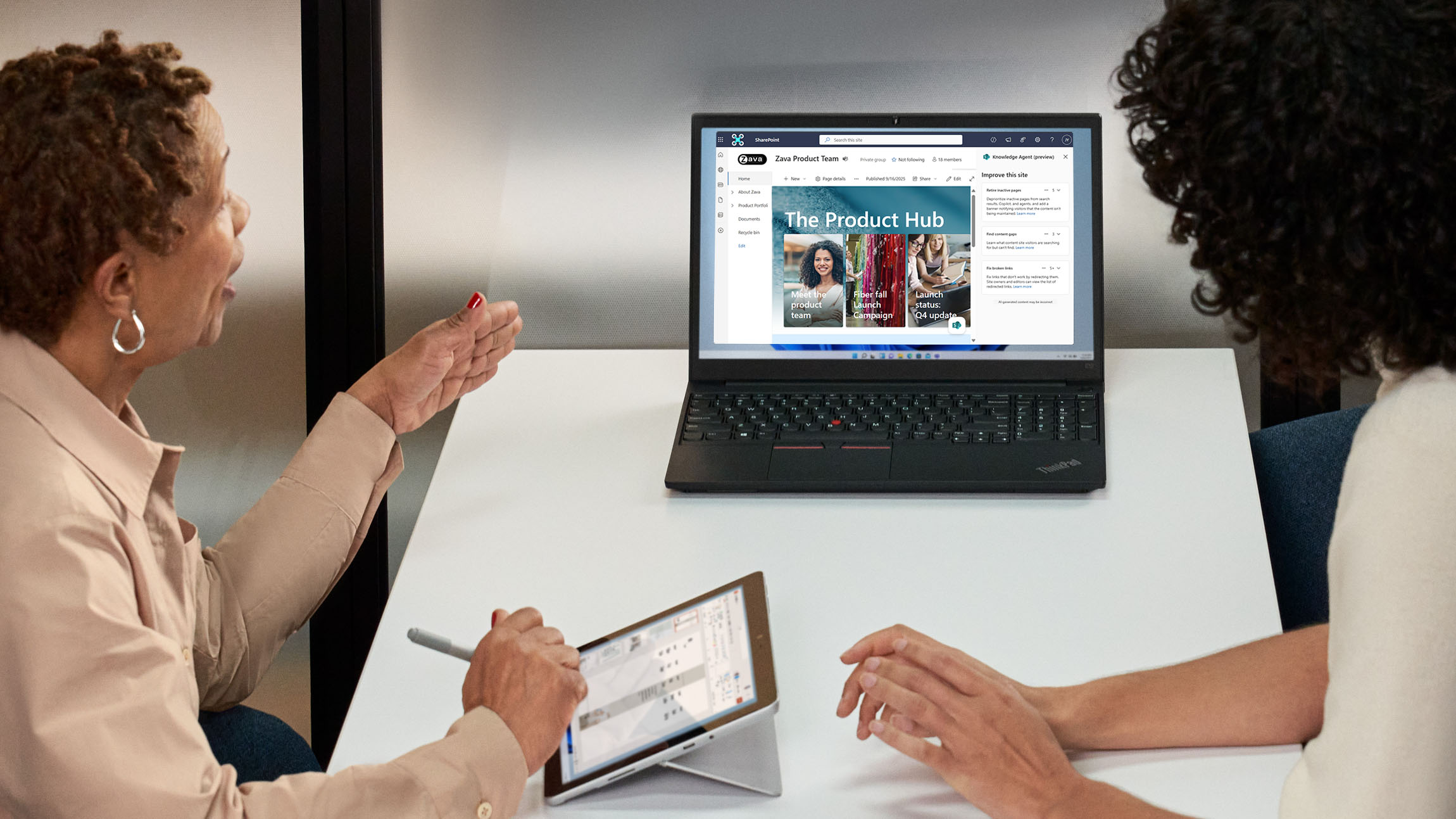
Microsoft workplace collaboration photograph showing colleagues reviewing a SharePoint product hub on a laptop
Bring knowledge, people and processes together. Modern intranets, shared documents and collaboration designed around your organisation.
01 Connected information Organise documents and resources across suitable sites.
02 Better collaboration Support document sharing and eligible co-authoring.
03 Appropriate access Manage permissions and information-sharing settings.
04 Flexible development Create sites, pages and supported business workflows.
What Is Microsoft SharePoint?

A better place for the information your business depends on.

Many organisations still store important files across email attachments, network drives, personal folders and disconnected systems.

Over time, this can make it difficult to understand which information is current, who owns it and who should have access.

Microsoft SharePoint provides a platform for building websites, document libraries and content management environments that support business collaboration.

Employees can use suitable SharePoint sites to access shared information, work with supported Microsoft 365 documents, publish internal updates and collaborate across departments.

Modern SharePoint also supports responsive pages, site navigation, information discovery and integration with other Microsoft 365 services.

The key is designing an environment with clear structure, sensible permissions, appropriate governance and a straightforward employee experience.

Explore SharePoint Consulting →
Official Microsoft SharePoint product visual showing content and collaboration across desktop and mobile devices
SharePoint across your workplace. A Microsoft product illustration showing shared content and collaboration experiences.
Microsoft SharePoint Services

Build a SharePoint environment around your business.

Explore the core SharePoint services that can support document management, intranets, information sharing, security and ongoing platform administration.

02

Business Intranet Development

Create modern internal SharePoint experiences for company news, policies, departmental information and employee resources.

03

Document Management

Organise shared files using suitable libraries, metadata, permissions, version history and document management processes.

04

SharePoint Migration

Plan supported migrations from existing file shares, SharePoint Server or other eligible content sources.

05

SharePoint Security

Review site permissions, sharing arrangements, administrative access and relevant information protection requirements.

06

Microsoft Teams Integration

Connect suitable SharePoint document libraries and information resources with supported Microsoft Teams experiences.

07

Power Automate Workflows

Explore eligible automated approvals, notifications and document-related processes using Microsoft Power Automate.

08

SharePoint Governance

Establish suitable ownership, content lifecycle, site creation and information-sharing standards.

09

Ongoing SharePoint Management

Define appropriate maintenance, site administration, support, reporting and improvement responsibilities.

SharePoint Intranet Solutions

Create a digital home for your organisation.

A company intranet can provide employees with a central destination for important internal information, resources and business communications.

Modern SharePoint communication sites can support company announcements, departmental pages, employee resources and other publishing scenarios.

SharePoint hub sites can help connect related sites through common navigation and themes while allowing each site to maintain its own permissions.

A well-planned intranet should also consider how information is created, reviewed, published and eventually updated or retired.

  • Company intranet architecture
  • Modern SharePoint communication sites
  • Departmental and team sites
  • Hub sites and shared navigation
  • Internal news and announcements
  • Employee policies and procedures
  • Business resources and quick links
  • Content ownership and publishing processes
  • Mobile-responsive page experiences
Discuss SharePoint Intranet Design →
Company Intranet Architecture ILLUSTRATIVE

One connected information experience.

A simplified example showing how a business intranet might organise important employee content.

Company SharePoint Intranet News • Announcements • Resources • Company Information
DEPARTMENT 01 Human Resources Policies, onboarding information and approved employee resources.
DEPARTMENT 02 IT Services Technical guidance, helpdesk information and approved applications.
DEPARTMENT 03 Operations Procedures, shared documents and business process information.
DEPARTMENT 04 Projects & Teams Relevant collaboration sites, project resources and document libraries.
Conceptual architecture. Associated SharePoint sites do not automatically inherit hub-site access permissions.
SharePoint Document Management

Organise documents without losing control.

Business documents need more than a place to be stored.

Employees should be able to locate the right information, understand which version to use and collaborate according to appropriate access permissions.

SharePoint document libraries provide supported options for organising files, adding metadata, managing access and viewing version history.

Depending on the file type and Microsoft 365 configuration, eligible employees can also work together on documents using supported co-authoring experiences.

Document management design should consider content ownership, retention requirements, naming standards and the practical needs of different departments.

  • Document library planning
  • Metadata and content types
  • Version history configuration
  • Document access permissions
  • Microsoft 365 co-authoring
  • Content naming and organisation
  • Search and information discovery
  • Document approval processes
  • Retention and archiving requirements
Explore SharePoint Document Management →
Microsoft SharePoint product screenshot illustrating document content and AI-assisted metadata organisation
Content organised for collaboration. Official Microsoft SharePoint product illustration.
Inside Microsoft SharePoint

Explore Microsoft's modern content platform.

These official Microsoft product examples show SharePoint site creation, information discovery, document organisation and content experiences.

Product screenshots are examples from Microsoft's public product pages; interfaces and available features may change.

Microsoft 365 Integration

Connect SharePoint with the tools your team already uses.

SharePoint works alongside different Microsoft 365 applications to support content and collaboration.

Microsoft Teams uses SharePoint for file storage in many channel collaboration scenarios, with different site arrangements for certain channel types.

OneDrive and SharePoint also provide complementary file management capabilities within Microsoft 365.

Eligible Microsoft 365 documents can support co-authoring and collaboration across compatible applications.

These integrations should be planned with appropriate sharing settings, ownership and identity controls to avoid confusion over where business information belongs.

  • Microsoft Teams and SharePoint integration
  • Team site and channel-site considerations
  • SharePoint document libraries
  • OneDrive and shared-content practices
  • Microsoft 365 document collaboration
  • Appropriate permissions management
  • Site ownership and governance
  • Employee adoption and training
Explore Microsoft Teams →
Connected Microsoft Technologies

Different tools. A connected workplace.

Microsoft Teams Conversations, meetings and suitable access to shared team files.
Microsoft SharePoint Team sites, document libraries, company information and content management.
Microsoft OneDrive Individual work file storage and supported collaboration.
Microsoft Power Platform Eligible integrations for business apps, workflows and information processes.
SharePoint & Power Automate

Turn routine document processes into connected workflows.

Many businesses rely on repeated manual steps when reviewing forms, requesting approvals or notifying departments about document changes.

SharePoint can work with Microsoft Power Automate to support eligible business processes and workflow automation.

Depending on the available connectors, licences and configuration, organisations can explore approvals, notifications, list updates and other processes triggered by SharePoint activity.

A suitable solution should include defined ownership, error handling, permissions and appropriate documentation.

  • Document approval workflows
  • Notifications and reminders
  • SharePoint list automation
  • File creation and update triggers
  • Business forms and data collection
  • Departmental review processes
  • Workflow monitoring
  • Automation security and licensing
Explore Power Automate →
Illustrative Approval Process

A simple example of workflow automation.

01 — Submit An authorised employee creates or submits an eligible document or list item.
02 — Notify A supported Power Automate flow sends an approval request or notification.
03 — Review The designated reviewer approves, rejects or requests further information.
04 — Record The configured workflow updates the relevant status or creates an appropriate audit trail.
Business colleagues discussing shared project information and documents during a team meeting
Information That Connects People

Make collaboration easier across every department.

The best intranet is one employees can understand, navigate and use in their everyday work.

A well-designed SharePoint environment can provide clearer access to important documents, resources, internal news and the information people need to complete their tasks.

Employee training, content ownership and appropriate maintenance are just as important as the initial technical implementation.

Discuss Your SharePoint Workplace →
SharePoint Migration Services

Bring your existing documents into a more organised environment.

Many organisations want to move documents from file servers, legacy SharePoint installations or other storage services into SharePoint Online.

A successful migration should consider the content being moved, existing folder structures, user permissions, version history, business applications and information ownership.

Microsoft provides the SharePoint Migration Tool for supported migration scenarios, including eligible on-premises file shares and SharePoint Server environments.

Before moving files, organisations should consider removing obsolete information, establishing suitable destination libraries and confirming which metadata and permissions can be preserved.

Testing and validation remain important because not every source feature or integration necessarily transfers in the same way.

  • Existing file share assessment
  • SharePoint Server migration assessment
  • Content inventory and classification
  • Site and document library design
  • User and group mapping
  • Permissions migration planning
  • Document versions and metadata
  • Migration testing and validation
  • Employee communication and adoption
Discuss SharePoint Migration →
Migration Readiness

Move the right information, not unnecessary complexity.

Review Current Content Identify files, data owners, existing permissions and redundant information.
Design Destination Sites Plan appropriate SharePoint libraries, metadata, information architecture and user access.
Test Migration Evaluate supported tools, transfer behaviour, version history and permissions.
Validate & Adopt Review migrated information and help employees understand the new environment.
SharePoint Security & Governance

Help the right people access the right information.

SharePoint stores important business content, so information-sharing controls and access permissions require careful consideration.

Modern SharePoint sites use different permission models depending on their purpose and relationship with Microsoft 365 groups or Teams.

An organisation should establish suitable ownership, external sharing policies and administrative controls.

Microsoft Purview can also provide relevant information protection, retention and governance capabilities, subject to licensing and configuration.

As sites and document libraries grow, periodic reviews can help identify outdated content, unused sites and unnecessary access.

  • SharePoint site ownership
  • Owners, members and visitors
  • Microsoft 365 group permissions
  • External sharing policies
  • Guest access considerations
  • Sensitive information management
  • Microsoft Purview retention and labels
  • Site lifecycle governance
  • Permissions reviews
  • Administrative access controls
Explore Managed Cloud Assurance →
Content Governance

Protect information through clear responsibilities.

Site Ownership Identify who manages each site, its content and access decisions.
Sharing Controls Review how internal and external users can access business information.
Information Lifecycle Establish suitable retention, review and retirement practices.
Regular Reviews Assess content, permissions and relevant security configuration changes.
Copilot in SharePoint

Prepare your business knowledge for AI-assisted work.

SharePoint has become an important information platform for Microsoft 365 Copilot and other supported AI-powered experiences.

Copilot in SharePoint can provide eligible users with capabilities for working with site content, answering questions, organising information and creating relevant resources.

Some advanced content processing and automated AI workflows require additional consumption-based billing and Copilot Credits.

Before adopting these capabilities, businesses should assess information quality, access permissions, metadata, site ownership and data governance.

A well-structured SharePoint environment can help provide more useful business information to supported AI tools, while permission management remains essential.

  • SharePoint AI readiness
  • Microsoft 365 Copilot licensing
  • Copilot in SharePoint capabilities
  • Information classification
  • Metadata and content organisation
  • SharePoint permission reviews
  • Responsible AI policies
  • Copilot Credits and usage-based billing
Explore Microsoft Copilot →
Official Microsoft SharePoint visual showing AI-assisted content and knowledge discovery
Microsoft SharePoint and AI. Explore eligible AI-powered information discovery and content management experiences.
Where SharePoint Can Help

Flexible information solutions for different teams.

SharePoint can support a wide variety of business scenarios, from internal communications to structured content collaboration and departmental resources.

01 / HUMAN RESOURCES

Employee Resources

Create suitable destinations for approved policies, onboarding documents and HR information.

02 / OPERATIONS

Procedures & Processes

Organise authorised procedures, business guidance and operational documents.

03 / MANAGEMENT

Company Communications

Publish internal news, updates, events and leadership communications.

04 / PROJECTS

Project Collaboration

Create suitable project workspaces, document libraries and team resources.

05 / COMPLIANCE

Controlled Information

Support appropriate access rules, metadata and retention for selected business content.

06 / IT SERVICES

Knowledge & Support

Provide approved technical guides, employee resources and internal support information.

Our SharePoint Approach

From information challenges to a connected SharePoint environment.

A successful SharePoint implementation considers business requirements, information structure, permissions, employees and ongoing ownership.

STAGE 01

Discover

Understand your information, employees, existing systems and business goals.

STAGE 02

Assess

Review data, site requirements, permissions, licensing and governance.

STAGE 03

Design

Plan information architecture, sites, libraries, navigation and access.

STAGE 04

Implement

Configure approved sites, content structures and suitable integrations.

STAGE 05

Adopt

Support content owners, employee training and information migration.

STAGE 06

Improve

Review site health, permissions, content quality and ongoing needs.

Managed SharePoint Services

Your SharePoint environment should evolve with your business.

SharePoint sites change as departments grow, employees move roles, new documents are created and business requirements evolve.

Without clear responsibilities, content may become outdated, sites can lose active ownership and information-sharing arrangements may become difficult to manage.

An ongoing SharePoint management approach should consider appropriate administration, site reviews, permissions, content lifecycle and employee support.

Specific support activities and frequencies should be defined around the organisation's needs and contractual arrangements.

  • SharePoint site administration
  • Document library management
  • Content and site ownership reviews
  • Permissions and external sharing reviews
  • Governance and policy updates
  • Site health and usage reporting
  • Employee training and technical support
  • Information organisation improvements
Discuss Managed SharePoint Services →
SharePoint Management

Maintain a platform people can continue to use.

Content Review important information, publishing responsibilities and content quality.
Permissions Assess access rights and changes to user or departmental requirements.
Structure Review libraries, sites, navigation and information discovery.
Improvement Explore supported new features, workflows and employee feedback.
Frequently Asked Questions

Microsoft SharePoint FAQs.

Answers to common questions about SharePoint Online, company intranets, document libraries, migration, permissions, Microsoft Teams and Copilot.

What is Microsoft SharePoint?

Microsoft SharePoint is a content management and collaboration platform that supports websites, document libraries, team workspaces, business intranets and related information-sharing scenarios.

What is SharePoint Online?

SharePoint Online is the cloud-based SharePoint service available through eligible Microsoft 365 and SharePoint subscriptions.

What can businesses use SharePoint for?

Common uses include employee intranets, shared documents, departmental resources, project collaboration, internal news, lists and appropriate business workflows.

Can SharePoint replace a traditional file server?

SharePoint Online can replace certain file-share use cases, particularly collaborative document storage. It is not a direct replacement for every file-server workload, application dependency or file-access pattern.

Can we build a company intranet with SharePoint?

Yes. SharePoint communication sites, pages and hub-site features support modern company intranets, including internal news, resources and departmental information.

What is a SharePoint team site?

A team site is designed for collaboration among members of a team or project. Many modern team sites are connected to Microsoft 365 groups.

What is a SharePoint communication site?

A communication site is commonly used to publish information to a wider audience, such as company announcements, organisational news and approved internal resources.

What is a SharePoint hub site?

A hub site connects related SharePoint sites through navigation and shared site experiences. Hub associations do not automatically change the permissions of connected sites.

What is a SharePoint document library?

A document library stores and organises supported files. Libraries can use metadata, views, permissions, version history and other document management features.

Can multiple employees edit the same SharePoint document?

Yes. Supported Microsoft 365 file types and applications can allow eligible employees to co-author content, subject to permissions and technical requirements.

Does SharePoint keep document version history?

SharePoint document libraries support version history. Available versions, retention and restoration behaviour depend on the library configuration and relevant service settings.

Can SharePoint manage document approvals?

Yes. Depending on the scenario, SharePoint and Power Automate can support suitable review and approval processes.

Can we migrate files from an existing network drive?

Yes. Microsoft's SharePoint Migration Tool supports eligible file-share migration scenarios. Source assessment, user mapping, file compatibility and destination planning are important.

Can SharePoint Server be migrated to SharePoint Online?

Supported SharePoint Server environments can be assessed for migration using suitable Microsoft tools. Customisations, workflows, permissions and other dependencies may need additional work.

Can SharePoint be used with Microsoft Teams?

Yes. SharePoint is an important component of Microsoft Teams file collaboration. Different Teams channel types may use different SharePoint site arrangements.

What is the difference between SharePoint and OneDrive?

OneDrive is generally centred on an individual's work files, while SharePoint supports shared content, team sites, document libraries and organisational information.

Can employees access SharePoint from home?

Yes. Authorised users can access supported SharePoint Online resources remotely using compatible devices and networks, subject to organisational access and security policies.

Can we restrict employees to particular SharePoint sites?

Yes. SharePoint supports permissions and membership controls for sites and content. The correct arrangement depends on the site type and associated Microsoft 365 groups.

Can external people access SharePoint documents?

Supported external sharing and guest access features may allow collaboration with authorised external users. Availability depends on tenant settings, site policies and permissions.

Is SharePoint secure?

SharePoint offers relevant security and information management features, but organisations remain responsible for access decisions, permissions, configuration, governance and other aspects of data protection.

Can Microsoft Purview work with SharePoint?

Yes. Eligible Microsoft Purview features can provide information protection, retention and governance capabilities for supported SharePoint content, depending on licensing and configuration.

Does SharePoint support Power Automate?

Yes. SharePoint can work with eligible Microsoft Power Automate connectors and workflows for supported document, list and approval scenarios.

Does SharePoint have AI capabilities?

Yes. Microsoft offers AI-powered experiences involving SharePoint content, Copilot, search and agents. Available capabilities depend on licence eligibility, tenant configuration and feature rollout.

Does Copilot in SharePoint require an additional licence?

Microsoft's current Copilot in SharePoint model includes everyday capabilities for eligible Microsoft 365 Copilot users. Advanced operations may require usage-based billing and Copilot Credits.

Can SharePoint content be used by Microsoft 365 Copilot?

Eligible Microsoft 365 Copilot experiences can use authorised SharePoint information according to supported permissions and access controls. Organisations should review oversharing risks and data governance before deployment.

Can SharePoint be customised to our company brand?

Modern SharePoint supports appropriate themes, navigation, page layouts and branded intranet experiences. Some advanced customisation may require additional development.

Does SharePoint provide backup and recovery features?

SharePoint offers versioning, recycle bin and supported recovery capabilities. Microsoft 365 Backup and other solutions may provide additional protection for eligible information, subject to configuration and pricing.

Can IRON IT Group assess our existing SharePoint environment?

A SharePoint assessment can be scoped around sites, permissions, document libraries, information architecture, governance, migration requirements and potential improvements.

How long does a SharePoint implementation take?

Timescales depend on the number of sites, complexity of the intranet, data migration volumes, existing permissions, technical integrations and employee training requirements.

How much does Microsoft SharePoint cost?

SharePoint Online is included in certain Microsoft 365 subscriptions and is available through eligible standalone offerings. Total cost depends on licences, storage, implementation, migration and support.

Related IRON IT Group Services

Extend your SharePoint environment with Microsoft technologies.

SharePoint works alongside Microsoft 365, Teams, Power Automate and suitable cloud security services.

01 / MICROSOFT 365

Microsoft 365 Services

Explore Microsoft 365 applications, Exchange Online, licensing, migration and workplace administration.

Explore Microsoft 365 →
02 / COLLABORATION

Microsoft Teams

Explore Microsoft Teams messaging, meetings, channels and workplace collaboration.

Explore Teams →
03 / AUTOMATION

Microsoft Power Automate

Explore document approvals, notifications and suitable automated business processes.

Explore Power Automate →
04 / AI

Microsoft Copilot

Explore AI-assisted productivity, information discovery, business knowledge and responsible adoption.

Explore Copilot →
05 / SECURITY

Managed Cloud Assurance

Explore Microsoft 365 security posture reviews, governance and cloud configuration assurance.

Explore Cloud Assurance →
06 / DATA PROTECTION

Microsoft 365 Backup

Explore supported SharePoint, Exchange Online and OneDrive backup and recovery options.

Explore Microsoft 365 Backup →

View All Modern Workplace Services →

Your Information. Your Workplace.

Ready to bring your business information together?

Talk to IRON IT Group about Microsoft SharePoint intranets, document management, SharePoint migration, Microsoft Teams integration, Power Automate workflows, information governance and ongoing SharePoint administration.