Business Laptops
Explore business-class Windows and macOS laptops for office, hybrid and mobile employees.
Portable workplace technologyModern businesses need dependable laptops, desktops, applications and IT equipment. But purchasing, configuring, supporting and replacing that technology can demand significant time and capital.
Technology as a Service (TaaS) offers a different approach: combining selected technology with agreed lifecycle services through a subscription or structured commercial arrangement.
IRON IT Group helps organisations explore technology procurement, managed device deployment, Microsoft Intune, NinjaOne, ongoing IT support and refresh planning.
Choose the technology your employees need, understand the available commercial options and build a more manageable approach to your IT estate.

Traditional IT procurement often starts with buying hardware and then arranging its setup, maintenance and eventual replacement separately.
This can work well for many businesses, but it also creates responsibilities for equipment selection, asset tracking, security, repairs and refresh planning.
Technology as a Service provides a framework for bringing some or all of these elements together under a defined service and payment arrangement.
Depending on the chosen provider and agreement, a TaaS model may combine devices, suitable software, deployment, maintenance, support and end-of-term handling.
IRON IT Group can help businesses evaluate whether equipment procurement, a managed lifecycle programme or a suitable third-party subscription model offers the better operational and financial fit.
Explore Technology Lifecycle Planning →Every organisation has different requirements. The right hardware depends on job roles, applications, mobility, performance, security and the working environment.
Explore business-class Windows and macOS laptops for office, hybrid and mobile employees.
Portable workplace technologyConsider suitable desktop PCs, all-in-one systems and specialist workstations for employee and application requirements.
Office and fixed-workstation environmentsPlan appropriate displays, docking stations, keyboards, mice, webcams and other workplace accessories.
Complete employee workstation setupsEvaluate compatible tablets and mobile equipment for field teams, mobile staff and specialist business scenarios.
Mobile productivity and field workExplore suitable business networking, wireless, collaboration and peripheral equipment where included in the agreed scope.
Connected offices and shared workspacesConsider eligible software licences, device management and endpoint protection alongside hardware procurement.
Applications, management and protectionEquipment brands, models, pricing, availability and subscription eligibility must be confirmed for each requested solution.
Ordering devices is only the first stage of a successful technology rollout.
Each computer may need inventory records, appropriate system settings, business applications, security configuration and access to your organisation's services.
For eligible Windows devices, Microsoft Windows Autopilot and Microsoft Intune can help support cloud-based setup and policy deployment.
Where appropriate, pre-provisioning or other supported deployment processes can help prepare devices before an employee begins work.
The final approach should reflect hardware compatibility, licensing, application requirements and how the business wants to manage devices after deployment.

Treat technology as an ongoing business asset rather than a one-time purchase. The following six stages provide a framework for managing suitable equipment throughout its working life.
Assess the user, applications, required specifications and available commercial arrangements.
Identify suitable equipment, suppliers, delivery requirements and associated software.
Prepare devices, record assets and deploy approved applications and security settings.
Review patching, device health, support, protection and operational requirements.
Review equipment condition, supported lifecycle dates and replacement requirements.
Plan information erasure, return, reuse, recycling or disposal as agreed.
Purchasing equipment, leasing it and obtaining it through a subscription are different arrangements. Each has potential advantages and important contractual considerations.
Purchase suitable hardware under agreed terms and own it according to the sale agreement.
Maintenance, software, warranties, refresh and disposal can be managed separately or through an associated IT service.
Explore an arrangement that brings specified devices and eligible services into recurring payments over a defined period.
Ownership, upgrades, maintenance, usage restrictions, cancellation and end-of-term responsibilities depend on the contract.
Evaluate suitable financing or leasing proposals from an authorised provider where available.
Eligibility, credit approval, total payments, fees and ownership or return provisions are determined by the finance agreement.
A monthly payment can make costs easier to plan, but it is important to compare the total commitment, support inclusions and equipment arrangements—not just the initial price.
| Consideration | Outright Purchase | TaaS or Leasing Model |
|---|---|---|
| Initial expenditure | Generally the purchase price upfront | May involve smaller initial payments plus recurring charges |
| Equipment ownership | Usually the purchaser, subject to sale terms | Depends on the agreement; ownership may remain with the supplier or lessor |
| Refresh arrangements | Organised separately by the business | May be scheduled or available under agreed renewal terms |
| Maintenance and support | Separate warranty or service agreements may be needed | May be bundled or separately charged |
| Flexibility | Business can usually choose when to replace owned equipment | Changes may be subject to minimum terms, adjustments or fees |
| End-of-term handling | Business decides on resale, recycling or disposal | May require return, renewal, purchase or other contract-defined action |
| Total cost | Purchase, support, repair, software and disposal costs | Recurring payments, fees, services and any end-of-term obligations |
A modern device lifecycle should include the tools and processes needed to administer business equipment after it has been delivered.
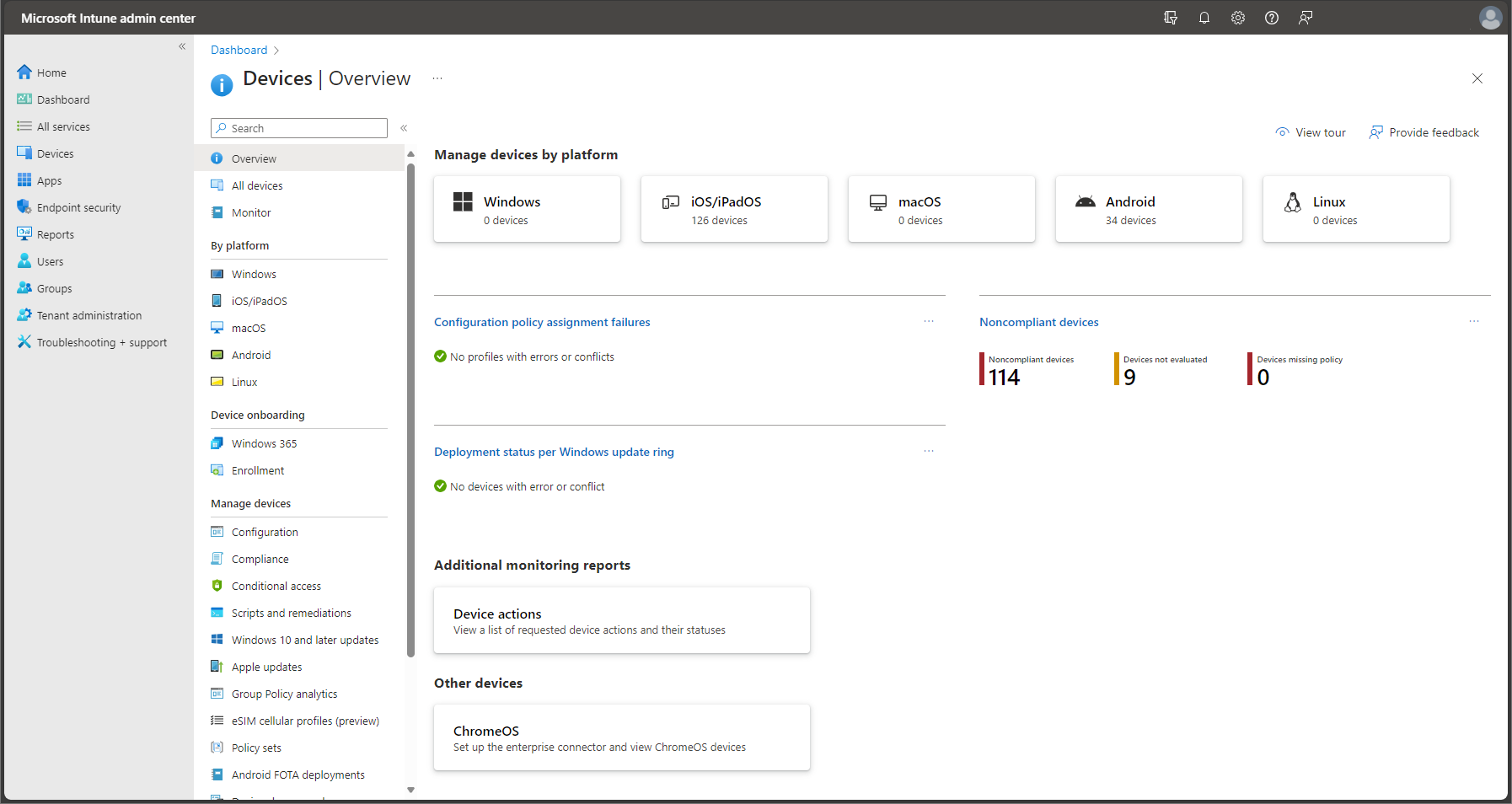
Microsoft Intune provides cloud device enrolment, configuration, application management and compliance capabilities for supported platforms.
NinjaOne can complement an environment with suitable endpoint monitoring, patching, software deployment, scripting and remote technical support.
Where both platforms are used, it is important to establish clear responsibilities and avoid conflicting device policies or maintenance actions.
These technologies can be considered as part of a broader equipment management arrangement, with their licensing and service coverage defined separately.
A laptop subscription and a managed IT support agreement do not necessarily provide the same services.
One may concern ownership, device replacement and payment terms, while the other focuses on employee support, software, security and ongoing IT operations.
When planned together, these arrangements can create a clearer process for employees who need new equipment, technical assistance or replacement devices.
An effective programme should explain what happens when a device fails, how warranties are handled, which team supports the user and what replacement provisions apply.
Business technology eventually reaches the point where it no longer meets performance, security or operational requirements.
A responsible lifecycle plan should consider whether equipment can be repaired, reused, refurbished or appropriately recycled.
Before a device leaves the organisation, the business should assess where information is stored and establish an appropriate data sanitisation process.
For some situations, certified recycling or specialist asset disposal providers may be required.
A suitable end-of-life arrangement can help improve asset accountability and support organisational environmental objectives, although the exact outcome depends on the method and provider selected.

From a new starter receiving their first laptop to an established employee moving to upgraded hardware, workplace technology should support the way people work.
Appropriate planning can help standardise equipment, reduce repetitive setup tasks and keep the ownership of support and maintenance responsibilities clear.
A successful technology programme focuses on the people using the devices as much as the hardware itself.
Discuss Your Workplace Technology →The value of a TaaS model depends on the equipment selected, the commercial arrangement and the operational services included.
Explore defined payment schedules and understand the wider costs of equipment ownership and management.
Select suitable technology specifications according to job roles, workloads and employee needs.
Establish repeatable procedures for preparing, configuring and delivering eligible devices.
Track relevant device information, user assignments and important lifecycle dates.
Align device arrangements with suitable employee support, maintenance and security processes.
Review device replacement decisions before aging hardware creates avoidable operational difficulties.
Technology subscriptions, lease agreements and managed hardware packages can vary significantly.
Before signing, it is important to understand which equipment and services are covered, how payments are calculated and what happens if the business needs to change its device count.
Equipment ownership, warranty cover, insurance, cancellation, minimum terms and the treatment of lost or damaged devices can all affect the true cost.
Businesses operating in the UK and US should also confirm local contract, tax, finance and data disposal requirements.
Answers to common questions about hardware subscriptions, equipment purchasing, leasing, lifecycle support, Microsoft Intune, NinjaOne and technology refresh.
Technology as a Service, or TaaS, is an approach to obtaining technology and related lifecycle services through a defined subscription or contractual arrangement. The exact combination of hardware, software, management and support depends on the offering.
Not necessarily. Equipment leasing focuses on contractual use and payment for assets, while a TaaS offering may combine equipment with deployment, maintenance, management and other services. The specific contract determines the legal and financial treatment.
Monthly hardware arrangements are available through certain manufacturers and finance or service providers. Eligibility, product choices and terms depend on the actual supplier. IRON IT Group can discuss suitable procurement and lifecycle requirements; specific recurring-payment availability must be confirmed.
Financing or leasing should only be represented as available when an appropriate provider and arrangement have been confirmed. Any third-party finance proposal would be subject to applicable terms, eligibility and approval.
Depending on the agreed service, eligible technology may include laptops, desktop PCs, monitors, peripherals, mobile devices, software licences and selected networking or collaboration equipment.
Device selection depends on business requirements, supplier availability, platform compatibility and the applicable procurement or subscription agreement. Suitable manufacturer and model choices should be confirmed before ordering.
These manufacturers offer business equipment suitable for many workplace scenarios. Whether a particular product is available within a subscription depends on the provider, region, stock and commercial terms.
Yes. macOS devices can be evaluated for suitable business roles, with appropriate Apple device management, application compatibility and support requirements. Subscription availability is supplier-dependent.
Not automatically. Microsoft 365 licences may be included in some packages or purchased separately. Software entitlements, renewal terms and pricing must be clearly specified.
Some service models bundle IT support, while others provide equipment only. Support hours, hardware repairs, software assistance, endpoint management and service-level commitments should be defined in the agreement.
Supported deployment services can include suitable registration, configuration and applications. Device-readiness requirements depend on procurement arrangements, Windows or Apple provisioning methods, licensing and network access.
Windows Autopilot is a Microsoft collection of technologies for setting up, preconfiguring, resetting and repurposing eligible Windows devices. It can work with Microsoft Intune and appropriate Microsoft Entra identity arrangements.
Intune can be used for supported device enrolment, configuration, application distribution, compliance and security policies when the organisation has the required licences and configuration.
NinjaOne can provide operational monitoring, patch management, automation and remote support for supported endpoints. It requires suitable deployment, licences and defined management responsibilities.
Responsibility depends on the service agreement. A managed device programme may include agreed patch policies and deployment processes, while an equipment-only contract may leave software maintenance to the customer.
Some technology lifecycle agreements include defined refresh or replacement options. The interval, eligible hardware, conditions and additional charges must be confirmed in the contract.
Some arrangements allow additions and removals, but minimum equipment quantities, notice periods, fees and contractual commitments may apply. The flexibility should be confirmed before signing.
The relevant warranty, insurance, accidental-damage coverage and contract terms determine the available repair or replacement options and any charges.
The organisation should follow its security and incident procedures, including suitable account controls, device-management actions and contractual reporting. Financial responsibilities depend on the applicable agreement and coverage.
Depending on the contract, equipment may need to be returned, renewed, replaced or purchased. End-of-term data sanitisation, shipping and condition requirements should be agreed beforehand.
No. Access to refreshed hardware depends on the defined term, product eligibility, availability and upgrade provisions. A subscription should not be assumed to provide unlimited or automatic upgrades.
No. A subscription may help organise expenditure and services, but the total cost can exceed an outright purchase depending on contract length, included services, charges and the equipment's useful life.
No. Accounting treatment depends on the agreement, applicable accounting standards and jurisdiction. Businesses should obtain advice from their accountant regarding lease accounting, depreciation and financial reporting.
A carefully managed lifecycle can support repair, reuse, refurbishment and responsible recycling. The actual environmental impact depends on equipment selection, energy consumption, transport and disposal methods.
Data should be sanitised using a method appropriate for its sensitivity and the storage technology. Depending on requirements, this may involve supported secure-erase methods, verified destruction or a qualified specialist provider.
Potentially. Small businesses may benefit from structured hardware planning and integrated device support. Minimum quantities, contract costs and commercial eligibility must still be evaluated.
A suitable service can be designed around multiple premises and remote employees, subject to supplier coverage, equipment delivery, support arrangements and regional contract requirements.
A device lifecycle assessment can examine inventory, age, performance needs, operating system support, warranties and possible replacement priorities.
Costs depend on the equipment, user count, contract, financing arrangements where available, software, device management and support. Contact IRON IT Group to discuss your requirements and the available options.
Explore related services that support the devices, employees and cloud platforms used across your organisation.
Explore Microsoft Intune, NinjaOne, Windows Autopilot, patching and remote endpoint support.
Explore Device Management →Explore Microsoft 365 applications, licensing, collaboration and cloud administration.
Explore Microsoft 365 →Explore business technology assistance, device troubleshooting and suitable ongoing IT services.
Explore IT Support →Talk to IRON IT Group about business laptops, desktop equipment, procurement, Technology as a Service options, Microsoft Intune, NinjaOne, employee onboarding and device lifecycle management.