Every device. Managed, secured and supported.
Your employees rely on laptops, desktops, mobile devices and business applications every day. Keeping these systems configured, updated and performing properly is essential to a productive workplace.
IRON IT Group helps businesses manage their device environments through technologies such as Microsoft Intune and NinjaOne, combining cloud device management with remote monitoring, patching and IT support capabilities.
From Windows Autopilot and device enrolment to endpoint monitoring, software deployment and employee offboarding, we help organisations explore a more consistent approach to managing business technology.
Keep control of your devices, wherever your people work.
Business devices are no longer confined to a single building. Employees may work from offices, home environments, customer sites and other locations.
This can create challenges for device setup, operating system updates, software installation, technical support and information security.
A structured device management approach provides processes for bringing devices into management, maintaining their configuration, investigating problems and retiring equipment securely.
Microsoft Intune offers cloud-based endpoint management, while NinjaOne provides remote monitoring and management capabilities that may complement your wider Microsoft 365 environment.
The appropriate platform, or combination of platforms, depends on device ownership, operating systems, licensing, support responsibilities and technical requirements.
Explore Endpoint Management →Understand the issues before choosing the tools.
Manage business devices through the Microsoft cloud.
Microsoft Intune provides device and application management capabilities for supported Windows, macOS, iOS/iPadOS, Android and Linux environments.
It can help organisations enrol devices, distribute applications, configure technical settings and assess whether supported devices meet defined compliance requirements.
Together with Microsoft Entra ID, applicable device compliance information can help inform access decisions through supported Conditional Access policies.
Intune can also support Windows Autopilot provisioning and selected app-protection scenarios for personally owned devices.
- Microsoft Intune deployment and configuration
- Device enrolment and Microsoft Entra integration
- Windows Autopilot provisioning
- Windows, macOS, iOS/iPadOS and Android policies
- Device compliance and configuration baselines
- Application deployment and protection
- Endpoint security policy configuration
- Remote retirement and wipe procedures

Monitor, maintain and support endpoints with NinjaOne.
NinjaOne is a cloud-based endpoint management platform designed to help IT teams oversee devices, monitor operational health and automate routine technical tasks.
Its capabilities include patch management, software deployment, system monitoring, alerting, scripting and supported remote access.
NinjaOne can be especially useful when an organisation needs visibility into device health, software versions, update status and technical issues across distributed locations.
It also supports management scenarios involving Windows, macOS and Linux endpoints, although individual features differ by operating system and subscription.
- Endpoint monitoring and alerting
- Windows, macOS and Linux management
- Operating system patch management
- Third-party application updates
- Software installation and deployment
- Device inventory and operational reporting
- Remote troubleshooting and assistance
- Scripts, automation and remediation workflows
Support every stage of your device estate.
Explore the practical capabilities that can be included in a managed device engagement, based on the tools, platforms and coverage agreed with your organisation.
Device Enrolment
Bring supported corporate and personal devices into an appropriate management process.
Windows Autopilot
Plan supported Windows device provisioning and configuration for employees.
Patch Management
Review, schedule and deploy applicable operating system and software updates.
Remote Monitoring
Monitor relevant device health, system events and operational conditions.
Application Deployment
Deliver supported business applications and manage appropriate software configurations.
Endpoint Security
Plan supported security baselines, encryption, access controls and device protection.
Remote IT Support
Assist authorised employees using suitable remote troubleshooting tools.
Compliance Policies
Define and review supported device compliance requirements.
Asset Inventory
Maintain appropriate visibility into managed devices and their technical characteristics.
Device Automation
Explore scheduled scripts and authorised automation for repeatable maintenance tasks.
Employee Onboarding
Establish consistent processes for preparing devices and required applications.
Secure Offboarding
Plan recovery of corporate access, device retirement and data removal where supported.
Microsoft Intune and NinjaOne: where does each fit?
The platforms overlap in selected areas, but their strengths and administration models differ. They can be evaluated separately or together.
| Capability | Microsoft Intune | NinjaOne |
|---|---|---|
| Primary focus | Device configuration, compliance, application and mobile device management | Endpoint operations, monitoring, patching, automation and remote support |
| Device enrolment | Strong native device-enrolment and MDM workflows | Agent-based endpoint management and separately available MDM capabilities |
| Windows Autopilot | Supports Autopilot device provisioning scenarios | Can complement device provisioning with software deployment and operational automation |
| Patch management | Windows update policies and supported platform-specific update management | OS and supported third-party application patch management |
| Security compliance | Native device compliance policies and integration with Microsoft Entra access controls | Endpoint health, patch status, reporting and supported security integrations |
| Remote troubleshooting | Intune Remote Help and other supported management actions, subject to licensing | Remote access and operational troubleshooting capabilities |
| Software deployment | Managed application assignments and app policies for supported platforms | Software deployment and automation for supported managed endpoints |
| Typical advantage | Microsoft 365, identity, MDM and device policy integration | Operational IT visibility, patching and technician productivity |
See Microsoft Intune and NinjaOne in action.
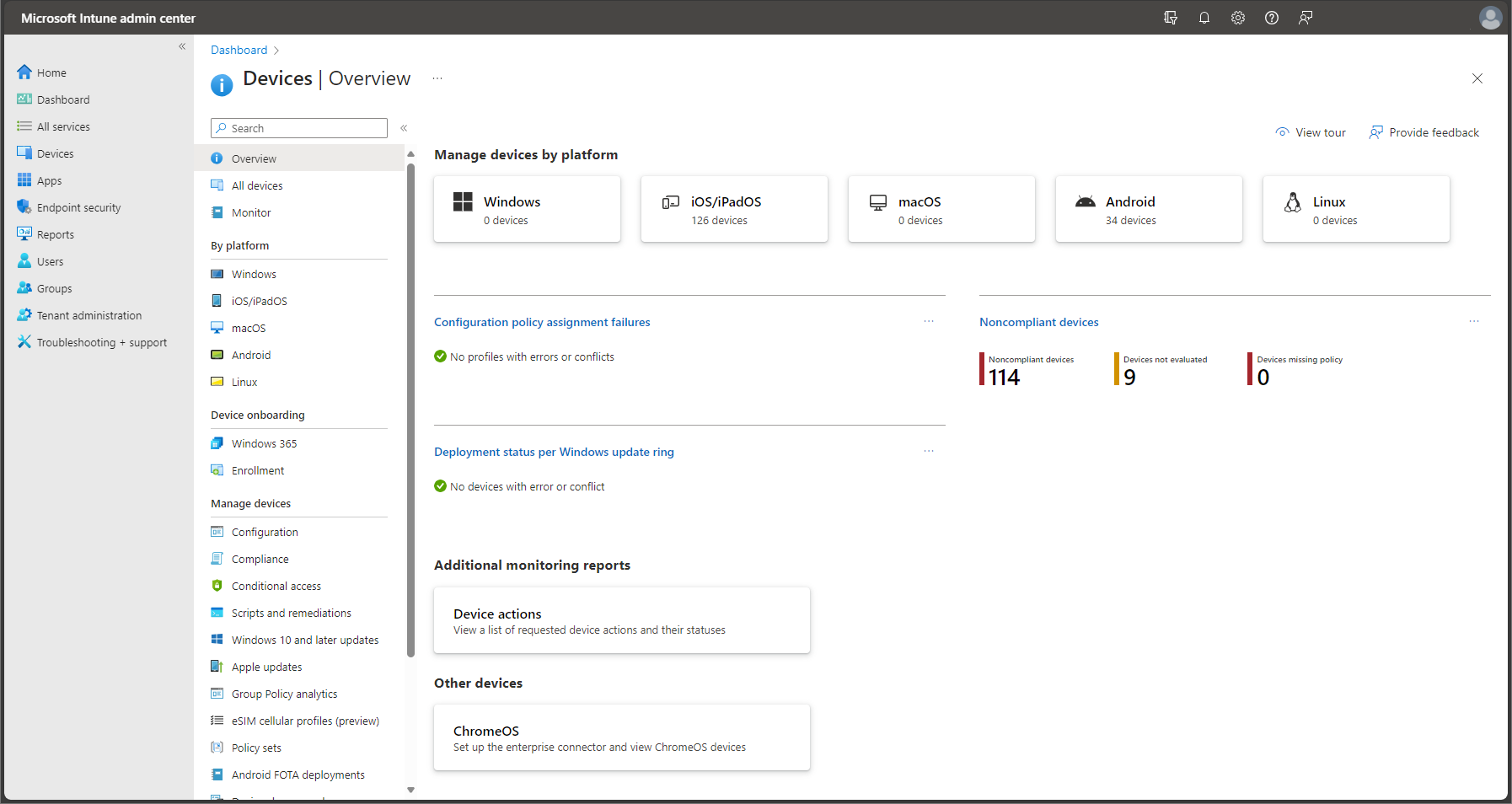
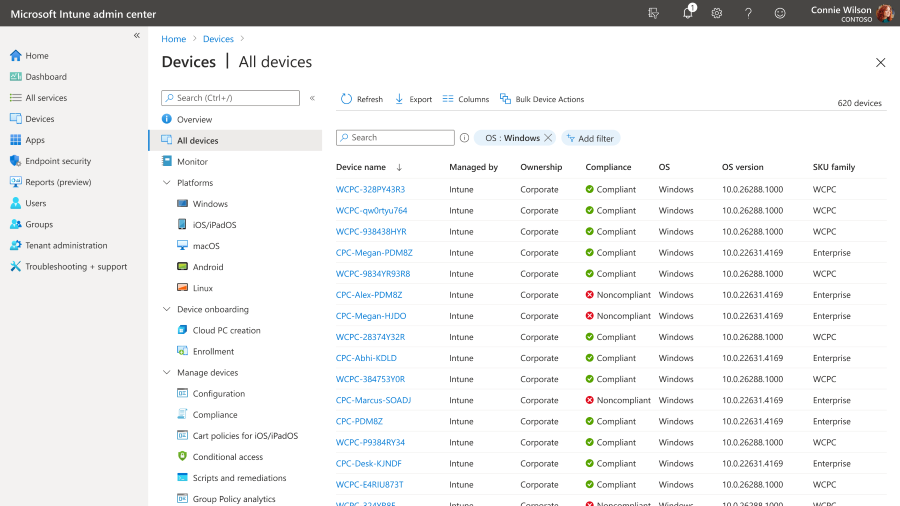
These genuine product examples illustrate how administrators review endpoints, device compliance and patch status.
Device Management Overview
Review supported device platforms, enrolment information, configurations and reporting from the Intune admin center.
Microsoft Intune Documentation →
Endpoint Compliance Visibility
Review enrolled-device information and support relevant compliance and operational decisions.
Explore Device Enrolment →
Software Update Visibility
Track patch activity, outstanding updates and relevant endpoint maintenance information.
Explore NinjaOne Patching →From the first day of work to secure device retirement.
A managed-device programme should consider how each device enters your organisation, receives configuration, stays supported and eventually leaves service.
Automated enrolment can help reduce repeated setup tasks for suitable devices. Once enrolled, policy-based management can help establish consistent settings and applications.
During daily operations, monitoring and patching can support troubleshooting, maintenance and security improvement.
At the end of a device's use, the organisation needs suitable procedures to revoke access, protect business data and prepare equipment for replacement, reuse or disposal.
- Device procurement and ownership records
- Windows Autopilot and appropriate enrolment
- Security and application configuration
- Monitoring and patch deployment
- User support and troubleshooting
- Warranty and replacement planning
- Corporate access removal
- Secure wipe or retirement where supported
One device. A complete management journey.
An example of how cloud management and endpoint operations can support an employee device.
Make setting up new employee computers more consistent.
Windows Autopilot is Microsoft's collection of technologies for preparing and configuring eligible Windows devices.
Combined with Microsoft Intune and suitable Microsoft Entra identity arrangements, it can help automate supported stages of device setup and configuration.
A business can establish suitable device profiles, application assignments and security policies so that employees receive a more consistent starting environment.
The setup still requires appropriate registration, licensing, network access, hardware compatibility and testing.
- Windows Autopilot readiness assessment
- Eligible device registration
- Enrolment and deployment profiles
- Microsoft Entra sign-in requirements
- Configuration and compliance assignments
- Microsoft 365 application deployment
- Employee onboarding procedures
- Device reset and reassignment options
Build a repeatable device setup process.
Keep supported systems updated with a structured patching process.
Operating system and application updates are important for managing vulnerabilities, reliability and compatibility.
NinjaOne offers supported patch deployment, automation, reporting and endpoint monitoring features. Intune also provides update management capabilities for supported device platforms and configurations.
A suitable patching strategy needs to consider which devices and applications are in scope, how updates are approved, when reboots may occur and how failures will be handled.
Not every update should be deployed immediately without testing. Business-critical applications may require a controlled rollout or additional validation.
- Operating system update planning
- Supported third-party software patching
- Patch approval and deployment policies
- Maintenance windows and reboot rules
- Update success and failure reporting
- Security priority assessment
- Exception handling and documentation
- Post-update troubleshooting
Protect business information across different device types.
A device management strategy should consider both organisation-owned devices and employee-owned equipment where bring-your-own-device policies permit access to business resources.
Microsoft Intune provides supported mobile device management and mobile application management approaches, including scenarios that protect work apps and data without requiring full management of a personal device.
For corporate devices, security policies may include appropriate encryption, authentication, endpoint protection and configuration requirements.
NinjaOne can complement suitable environments with endpoint health visibility, operational reporting and supported maintenance workflows.
Neither product alone guarantees security or legal compliance. Device policies should be selected according to business requirements, platform capabilities, licensing and employee privacy expectations.
- Company-owned and personal-device policies
- Microsoft Intune device compliance
- Application protection for eligible BYOD scenarios
- Device encryption considerations
- Microsoft Defender integration where supported
- Microsoft Entra Conditional Access
- Device inventory and operational monitoring
- Secure retirement and access revocation
Manage devices without overlooking people and data.
Better visibility, more consistent support and fewer manual tasks.
A properly planned device management approach can help organisations manage increasing numbers of endpoints while supporting employee productivity.
Understand Your Devices
Review managed assets, device information and relevant operational status.
Apply Consistent Controls
Establish appropriate configuration and security policies for supported devices.
Reduce Repetitive IT Work
Explore automated device provisioning, software distribution and maintenance.
Assist Remote Employees
Use suitable troubleshooting tools for employees across supported locations.
Improve Patch Visibility
Track applicable software updates and investigate failed deployments.
Plan Device Replacement
Maintain appropriate procedures for onboarding, reassignment and equipment retirement.
Choose the right management platform and service coverage.
Microsoft Intune licensing can be included with certain Microsoft 365 subscriptions or purchased through eligible standalone offerings.
NinjaOne is a separate commercial platform with licensing and product options based on the selected services and agreement.
Organisations considering both should review how much functionality overlaps, which devices are covered and which technical tasks each platform will handle.
Additional products, including endpoint security, remote assistance, backup or advanced management capabilities, may introduce separate charges.
- Microsoft 365 and Intune licence review
- NinjaOne product and subscription options
- Device count and operating system mix
- Corporate versus personally owned devices
- Software deployment requirements
- Remote support and monitoring scope
- Security and backup requirements
- Agreed support hours and service levels
Consider the full cost of operating your endpoints.
From device assessment to ongoing support.
A structured engagement should define how devices are enrolled, protected, maintained and supported, with clear technical ownership.
Discover
Review employees, devices, operating systems, existing tools and business requirements.
Assess
Evaluate licensing, enrolment readiness, security needs, patching and support gaps.
Design
Plan appropriate Intune policies, NinjaOne workflows and device lifecycle processes.
Implement
Configure agreed systems, enrol supported endpoints and validate management procedures.
Manage
Review device health, updates, security settings, support needs and improvements.
Device Management FAQs.
Answers to common questions about Microsoft Intune, NinjaOne, Windows Autopilot, device security, remote support and software patching.
What is device management?
Device management is the process of configuring, maintaining, securing and supporting devices such as laptops, desktops, tablets and smartphones throughout their working lives.
What is Microsoft Intune?
Microsoft Intune is a cloud-based endpoint management platform used for supported device enrolment, configuration, compliance, application management and security policies.
What is NinjaOne?
NinjaOne is an endpoint management platform that supports capabilities such as remote monitoring, patching, software deployment, device inventory, automation and remote assistance. Additional products include mobile device management and backup.
Can Microsoft Intune and NinjaOne be used together?
Yes, they can be evaluated together for complementary capabilities. Organisations should define which platform owns specific policies, patching actions and administrative tasks to avoid conflicting management activities.
What is the difference between Intune and NinjaOne?
Intune is strongly focused on device enrolment, MDM, application management, compliance and Microsoft identity integration. NinjaOne emphasises operational endpoint management, patching, monitoring, automation and remote troubleshooting, although some features overlap.
What is Windows Autopilot?
Windows Autopilot provides Microsoft technologies for provisioning and configuring eligible Windows devices, often together with Intune and Microsoft Entra ID.
Can Microsoft Intune manage Mac computers?
Yes. Intune supports eligible macOS devices. Available management capabilities depend on the macOS version, enrolment method, licences and configuration.
Can NinjaOne manage Mac computers?
Yes. NinjaOne provides supported macOS endpoint management and patching capabilities. Individual feature availability should be checked against its current documentation.
Can you manage both Windows and Linux devices?
Microsoft Intune and NinjaOne both offer selected Linux capabilities, although the supported management models and features differ from Windows. Compatibility should be verified for the required distributions and versions.
Can Intune manage mobile phones and tablets?
Yes. Intune supports eligible iOS/iPadOS and Android management scenarios, including corporate-owned and personal-device options subject to platform requirements.
Does NinjaOne offer mobile device management?
Yes. NinjaOne offers mobile device management capabilities as part of its wider platform offerings. Exact features, licensing and supported devices should be confirmed.
Can personal devices be managed without full control of the device?
In suitable scenarios, Intune app-protection policies can help protect work applications and information without requiring full device enrolment. Supported capabilities depend on the application, device platform and licensing.
Can Microsoft Intune install business applications remotely?
Yes. Intune supports deployment and management of eligible applications across supported platforms. Packaging and installation requirements vary by application and operating system.
Can NinjaOne deploy software?
Yes. NinjaOne provides software deployment and automation features for supported devices and applications, subject to product capabilities and configuration.
What is patch management?
Patch management covers identifying, assessing, approving, deploying and reviewing software and operating system updates. A structured process considers vulnerability risk, compatibility and maintenance requirements.
Can NinjaOne patch third-party applications?
Yes. NinjaOne supports patching of a range of third-party applications. Coverage depends on the software, operating system and current product capabilities.
What is RMM software?
Remote Monitoring and Management software enables authorised IT teams to monitor endpoint status, receive alerts and perform supported maintenance or troubleshooting tasks remotely.
Can employees receive remote IT support?
Yes. Suitable tools can enable authorised technicians to assist supported users remotely. The service should include appropriate access controls, consent practices and documented support procedures.
What is device compliance in Microsoft Intune?
Device compliance policies evaluate supported device characteristics against configured requirements. Compliance status may be used with Microsoft Entra Conditional Access, subject to licensing and configuration.
Does Intune replace antivirus software?
No. Intune manages certain security policies and can integrate with protection products such as Microsoft Defender. It is not a substitute for a properly configured endpoint protection strategy.
Does NinjaOne replace an EDR solution?
No. NinjaOne supports endpoint management and selected security integrations, but endpoint detection and response capabilities require appropriate security products or separately licensed solutions.
Can business devices be remotely wiped?
Supported device-management systems can perform suitable remote actions, which may include wipe, retire or removal of corporate data. Availability and consequences depend on the management method and device platform.
Can IRON IT Group manage employee onboarding?
Employee device onboarding can be scoped to include appropriate provisioning, configuration, enrolment, applications and access requirements. The exact service should be agreed before implementation.
Can we keep an inventory of all our laptops and desktops?
Supported management platforms provide device inventory information. Complete asset records may also need procurement, ownership, warranty and lifecycle data maintained through appropriate processes.
Can device management help with cybersecurity compliance?
Device inventory, patch records and security policy information may support governance and audit requirements. However, using Intune or NinjaOne does not itself establish legal or regulatory compliance.
Does IRON IT Group offer 24/7 device monitoring?
Automated monitoring, notification schedules, human response hours and support coverage depend on the agreed contract. This page does not imply continuous human monitoring or guaranteed response times.
How much does Microsoft Intune cost?
Intune pricing depends on the relevant Microsoft subscription, standalone plan and additional features. Confirm eligible licensing and current Microsoft prices for your organisation.
How much does NinjaOne cost?
NinjaOne pricing depends on its commercial quotation, selected platform capabilities, endpoint requirements and service arrangement. Any IT provider administration costs should be assessed separately.
How long does device management deployment take?
Implementation times depend on the number of devices, supported operating systems, existing management tools, licensing, employee locations, applications and security requirements.
Connect device management with your wider IT environment.
Endpoint management works alongside Microsoft 365, secure cloud access, workplace connectivity and IT support.
Microsoft 365
Explore Microsoft 365 deployment, licensing, productivity applications and administration.
Explore Microsoft 365 →Managed Cloud Assurance
Explore security configuration reviews, Microsoft Entra and ongoing cloud assurance.
Explore Managed Cloud Assurance →IT Support
Explore device troubleshooting, user assistance and suitable managed IT support.
Explore IT Support →Ready to take better control of your business devices?
Talk to IRON IT Group about Microsoft Intune, NinjaOne, Windows Autopilot, endpoint monitoring, patch management, software deployment, remote support and secure device lifecycle management.