
01
Azure Virtual Machines
Run supported Windows and Linux workloads using cloud virtual machines sized for appropriate computing requirements.
Give your organisation the flexibility to modernise applications, connect infrastructure and explore new ways of working with Microsoft's cloud computing platform.
From Azure Virtual Machines and virtual desktops to cloud networking, security, backup and hybrid infrastructure, Microsoft Azure offers a wide range of technologies for today's business workloads.
IRON IT Group helps businesses assess, plan, implement and manage appropriate Microsoft Azure solutions with an emphasis on security, operational requirements and cost visibility.

Microsoft Azure provides cloud services for running applications, hosting infrastructure, storing information and supporting modern digital workloads.
Businesses can choose from services for computing, networking, databases, virtual desktops, monitoring, security and other technical requirements.
Azure can also work alongside existing infrastructure, allowing suitable workloads to remain on-premises while other systems use cloud services.
A successful implementation should begin with an assessment of your business needs. Not every workload requires the same hosting model, security controls or amount of computing capacity.
IRON IT Group approaches Microsoft Azure as part of your wider IT environment, considering existing networks, employees, applications, data and operational responsibilities.
Explore Azure for Your Organisation →
Azure includes a broad set of technologies that can support different workloads. These eight areas are useful starting points for a business cloud discussion.
Run supported Windows and Linux workloads using cloud virtual machines sized for appropriate computing requirements.
Deliver compatible Windows desktops and applications to authorised users through a centrally managed Azure-hosted virtual desktop environment.
Connect resources using suitable virtual networks, VPN gateways, routing, private connectivity and related network services.
Explore cloud file, object and disk storage options based on access requirements, workloads, security and performance.
Evaluate Azure Backup and Azure Site Recovery capabilities for supported business continuity and workload recovery scenarios.
Plan relevant access policies, workload protection, administrative controls and supported Azure governance capabilities.
Explore supported options for managing compatible infrastructure beyond Azure while considering hybrid networking and identity.
Review cloud resource health, operational telemetry, configuration and costs through suitable Azure management tools.
Azure Virtual Machines provide on-demand computing resources for supported operating systems and applications.
They may be suitable for certain business servers, application workloads, databases, development systems and other infrastructure requirements.
Choosing the correct VM involves understanding the required processor, memory, storage, networking, performance and availability characteristics.
Operating system patching, application security, backups and monitoring also need clear ownership under Microsoft's shared-responsibility model.

Azure Virtual Desktop is Microsoft's cloud-based desktop and application virtualisation service.
It allows eligible organisations to deliver Windows desktops and compatible applications from supported Azure infrastructure.
This can be useful for organisations with remote employees, multiple locations or business applications that benefit from centralised desktop management.
A suitable design needs to consider network performance, user identity, profiles, application compatibility, security, licensing and the cost of the infrastructure supporting desktop sessions.
Azure networking provides the foundations for communication between cloud workloads, existing infrastructure and authorised users.
Many Azure environments need networking that supports virtual machines, applications, storage, identity services and connections to existing business locations.
Microsoft Azure offers services including Azure Virtual Network, VPN Gateway, ExpressRoute, Firewall, Private Link and networking management capabilities.
For more complex deployments, a hub-and-spoke topology may allow shared networking services to be organised centrally while individual workloads operate in separate spoke networks.
The architecture should be selected according to connectivity requirements, performance, security, complexity and cost.
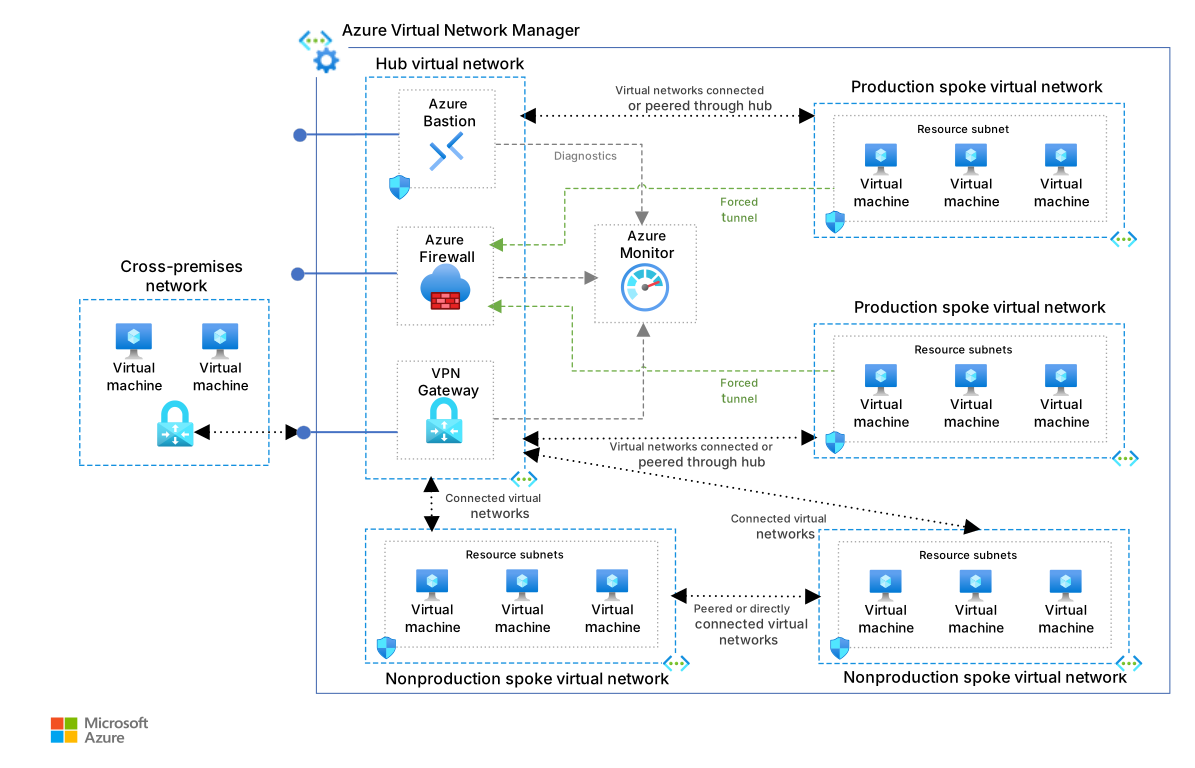
Microsoft Azure provides security services, but organisations still have responsibility for securing their own information, identities, configurations and workloads.
Incorrectly configured permissions, publicly accessible resources or unmanaged infrastructure can increase operational and cyber security risks.
An appropriate Azure governance approach considers identity, access, resource organisation, configuration, logging and ongoing management.
Services such as Microsoft Defender for Cloud, Azure Policy and Azure Monitor can form part of the wider security and operational approach.
Not every business workload has to move into the cloud at the same time. Azure provides technologies that can support hybrid infrastructure and gradual modernisation.
Integrate suitable on-premises networks and workloads with Azure services while retaining necessary existing systems.
Explore Azure Arc capabilities for managing compatible servers and other supported resources across different environments.
Review which applications should be migrated, modernised, replaced or retained according to technical and business requirements.
Business-critical workloads need appropriate recovery arrangements, whether they run on-premises or in Microsoft Azure.
Azure Backup provides protection and restoration capabilities for supported data sources and workloads.
Azure Site Recovery offers replication and recovery orchestration options for certain virtual machines and infrastructure scenarios.
These technologies serve different purposes. A suitable solution depends on the workload's Recovery Time Objective (RTO), Recovery Point Objective (RPO), compatibility and operational requirements.

Azure is about more than virtual servers or technical infrastructure.
It can support access to business applications, enable suitable virtual desktop environments and help IT teams manage selected workloads through cloud services.
The right approach considers how employees work, which applications they need and how the organisation will secure, support and maintain those systems.
Discuss Your Microsoft Cloud Goals →Good cloud management involves understanding your resources, applying appropriate operational controls and keeping expenditure visible.
Explore suitable telemetry, logging and alerting to support visibility into selected workloads and infrastructure.
Review relevant identity, workload access, network settings and security recommendations.
Establish appropriate subscriptions, resource groups, ownership and policy arrangements.
Review consumption, budgets, unused resources and opportunities for more appropriate resource sizing.
Define responsibilities for updates, configuration changes, backups and support.
Reassess resource requirements and architecture as business and application needs change.
Azure uses multiple pricing models depending on the resources and services selected. Many infrastructure services are charged according to consumption.
Costs can be affected by virtual machine size, operating hours, storage, network transfer, backup, licensing and other components.
Azure offers purchasing options that may reduce eligible costs, including reservations, savings plans and Azure Hybrid Benefit.
These arrangements should be assessed carefully because discounts, commitments and licensing eligibility vary.
A successful Azure project should consider business requirements, architecture, implementation, security and ongoing responsibilities.
Understand workloads, business goals, existing infrastructure and technical dependencies.
Evaluate suitability, risks, security, licensing, resource needs and cost.
Plan the Azure architecture, identity, networking, governance and resilience.
Deploy or migrate the agreed workloads with appropriate testing and change controls.
Review operation, performance, costs, security and future improvements.
The value of Azure depends on selecting appropriate services and implementing them to meet your organisation's actual needs.
Choose from Azure computing options suited to compatible business applications and processing needs.
Explore centralised desktop and application access for eligible users and supported environments.
Connect suitable existing infrastructure and cloud resources through supported networking options.
Use relevant identity, network and workload protection tools as part of an appropriately configured environment.
Evaluate backup, replication and availability solutions for critical workloads.
Explore monitoring, governance and cost management across suitable Azure services.
Answers to common questions about Azure infrastructure, virtual desktops, networking, security, managed services and pricing.
Microsoft Azure is Microsoft's cloud computing platform. It offers infrastructure, networking, storage, application, data, security, analytics and other services that organisations can use to support different workloads.
Azure can be used for virtual servers, application hosting, virtual desktops, data storage, databases, hybrid infrastructure, backup, disaster recovery and other supported computing scenarios.
Managed Azure services involve a provider carrying out agreed responsibilities such as administration, monitoring, security reviews, troubleshooting, configuration and optimisation. Exact responsibilities, support hours and service levels depend on the agreement.
Azure Virtual Machines are on-demand computing resources that run supported operating systems and applications. Customers retain responsibility for the management of many aspects of the deployed virtual machine.
Azure Virtual Desktop is a Microsoft service for delivering supported Windows desktops and applications through Azure infrastructure. Its suitability depends on user entitlements, application compatibility, networking, infrastructure and security requirements.
Yes. It can provide authorised users with remote access to compatible desktops and applications. The experience depends on device support, network connectivity, licensing and the configured environment.
Yes. Azure supports various hybrid networking and infrastructure capabilities. Some workloads can remain on-premises while others use Azure services, subject to technical compatibility and appropriate design.
Azure Arc provides management and governance capabilities for supported resources operating outside Azure, including certain on-premises and multicloud environments.
Azure Virtual Network provides private networking capabilities for Azure resources, including communication between supported services and connections to other networks.
Yes. Supported methods include site-to-site VPN and private connectivity options such as ExpressRoute. The correct approach depends on network requirements, availability, security and cost.
Azure provides a wide range of security services and infrastructure protections, but organisations must still configure and maintain appropriate access permissions, workload settings, data protection, networking and operational controls.
Microsoft Defender for Cloud provides cloud security posture management and workload protection capabilities for supported environments, depending on the selected plans and configuration.
Azure Backup is a service for protecting and restoring supported workloads and information through configured backup policies and recovery points.
Azure Site Recovery provides replication and disaster recovery orchestration capabilities for supported virtual machine scenarios. It is distinct from traditional backup and should be evaluated against recovery requirements.
No. Azure services have different availability features and service-level agreements, but application availability also depends on architecture, dependencies, configuration and operational circumstances.
Azure may offer flexible infrastructure and eligible pricing options, but savings are not guaranteed. Total costs depend on compute, storage, networking, licensing, workload configuration and operational management.
Azure Hybrid Benefit is a Microsoft licensing benefit that may reduce the cost of certain eligible Azure workloads when qualifying licences and programme requirements are met.
These are purchasing options that may offer eligible compute cost reductions in exchange for specified usage commitments or terms. Suitability and savings vary by service, configuration and agreement.
Azure uses different pricing arrangements across its services, including consumption-based and commitment-based options. Costs depend on resource selection, region, usage, storage, networking and additional features.
An Azure review can be scoped to examine architecture, workload requirements, identity, networking, security, operations and cost. The exact services available should be confirmed as part of the engagement.
Monitoring arrangements, support hours, response targets and emergency coverage depend on the agreed service contract. The availability of Azure monitoring tools does not automatically mean around-the-clock human support.
Timescales depend on the workload, complexity, existing infrastructure, networking, security, data migration and testing requirements.
Costs vary according to the chosen services, architecture, resource requirements, Microsoft charges, implementation and ongoing support. Contact IRON IT Group to discuss a suitable solution.
Explore services that complement Azure planning, implementation and operational resilience.
Explore cloud roadmaps, readiness assessments, architecture, governance and cost planning.
Explore Cloud Strategy →Explore workload migration, technical assessments, cutover planning and post-migration support.
Explore Cloud Migration →Explore recovery objectives, cloud backup, failover planning and disaster recovery testing.
Explore Disaster Recovery →Talk to IRON IT Group about Azure Virtual Machines, Azure Virtual Desktop, networking, cloud storage, security, hybrid infrastructure, disaster recovery and Azure cost management.